Forum

 
  Back to OzPolitic.com   Welcome, Guest. Please Login or Register
  Forum Home Album HelpSearch Recent Rules LoginRegister  
 

Pages: 1 2 3 4 ... 16
Send Topic Print
Computer Free Software & Help Sites (Read 143634 times)
moses
Gold Member
*****
Offline


Australian Politics

Posts: 6353
Re: Computer Free Software & Help Sites
Reply #15 - May 16th, 2013 at 9:15pm
 
Good one Kat Smiley

StarBurn 14.1 Homepage

StarBurn: All features you need free of charge in one solution

StarBurn offers all features concerning grabbing, burning and mastering of CD, DVD, Blu-Ray and HD-DVD you need free of charge - in one powerful and easy to use solution.

StarBurn's features:
  • Supports all MMC (Multi-Media Command Set) compatible CD/DVD/Blu-Ray/HD-DVD devices. StarBurn deals with devices in a "generic" mode meaning you don't need to get an updated version of our software to support a brand new burner - everything is quite simple;
  • Supports CD-R/RW, DVD-R/RW, DVD+R/RW, BD-R/RE, HD-DVD-R/RW and DVD-RAM media, including high-capacity double layer DVD+R and dual layer DVD-R;
  • DVD-Video main sequence (movie) extraction support due to which you can re-master the DVD and extract only the movie. Only the movie itself will be copied, but not the trailers and advertising from the original DVD;
  • Audio content processing support. StarBurn can store audio tracks as WAV (uncompressed) and WMA (compressed Windows Media Audio) files. Now you can create extra copies of your audio CD collection and listen directly from your PC hard disk, load compressed audio into portable player or car audio or burn WAV and WMA files back to create re-mastered audio CDs. So if you have an old CD-player or car audio that can't play MP3/WMA compressed data with StarBurn you can create an ordinary audio CD from files stored on your hard disk;
  • StarBurn can process audio streams on-the-fly. This means it can burn an audio CD from MP3/WMA files without de-compressing them and storing an intermediate copy on your hard disk. This is much faster than doing everything in two steps: first decoding and then actual burning;
  • UDF (Universal Disc Format) file system support (UDF 1.02, 1.50 and 2.01) means that from now on files larger than 2 GB and with names up to 2048 characters long can be stored on optical media. You don't need to use any additional tools to split huge files or rename long file names before burning them;
  • StarBurn supports ISO9660 file system, including Joliet Unicode extensions, which is the most compatible file system that can be read almost by any machine;
  • Track-At-Once (TAO) and Disc-At-Once (DAO) (RAW) recording modes support. In TAO everything is handled by the drive itself, application just passes 2048 bytes/sector streams (data) or 2352 bytes/sector streams (audio). With DAO, an application creates a raw virtual CD image and writes with 2448 (DAO96) or 2368 (DAO16) bytes/sector streams. TAO is the most compatible mode which is preferred for data (the only mode to create multisession CDs) and DAO allows you to create gapless audio CD, add CD-Text and CD+G information and some additional features;
  • Bridge file system (ISO9660/UDF for DVD-Video creation) support. StarBurn can create bridge file system which is DVD-Video compatible. This media can be read with both stand-alone DVD players and ancient Windows 95 and DOS machines, which makes the disk almost universal;
    •El Torito (bootable CD/DVD/Blu-Ray/HD-DVD) creation support. Use CD/DVD/Blu-Ray/HD-DVD as a very big floppy boot disk for recovery purposes;
  • Session import support (appending already created CD/DVD/Blu-Ray/HD-DVD media). In this mode the same media can be used for sequential recording, as the new data will perfectly co-exist with previously recorded data. The only limitation is your physical media capacity;
  • DVD9 to 2 DVD-R(+R) conversion support. In this mode StarBurn backs up dual layer stamped DVD9 DVD-Video disc into a pair of two DVD single layer recordables, as a pair of two single layer recordable discs is cheaper than single double/dual layer recordable.


Download StarBurn 14.1 Here
Back to top
 
 
IP Logged
 
moses
Gold Member
*****
Offline


Australian Politics

Posts: 6353
Re: Computer Free Software & Help Sites
Reply #16 - May 18th, 2013 at 3:22pm
 
Wise Program Uninstaller 1.37 Homepage

...

Wise Program Uninstaller is able to remove your software by safe uninstall. And it can repair the programs of Windows Office, Adobe etc. This freeware is better than similar programs at uninstalling stubborn and broken programs by force uninstall. Besides, the program search function is supported.

...Free of Charge
Wise Uninstaller is another freeware from WiseCleaner.com. All users are free to use it, update it and get the basic technical support on

...Support of Win 8
Wise Uninstaller has been tested many times on Win 8 (both 32 bits and 64 bits). It is quite compatible with Win 8.

...More thorough and complete
Wise Uninstaller can search out more leftovers after you uninstall an unwanted program and then it can provide a deeper and more thorough removal of the residual entries of the uninstalled program. This point has been verified by comparisons with Windows and other similar programs.

...Combined Safe Uninstall and Forced Uninstall together
Sometimes, you are annoyed by some stubborn programs or entries which can't be uninstalled/removed or completely uninstalled/removed by common uninstall or safe uninstall. But Forced Uninstall of Wise Uninstaller could uninstall/remove them easily and cheerfully.

...Added program repair feature
Wise Uninstaller provides you with the entrance to repair the installation of some programs.

Download Wise Program Uninstaller 1.37 Here
Back to top
 
 
IP Logged
 
moses
Gold Member
*****
Offline


Australian Politics

Posts: 6353
Re: Computer Free Software & Help Sites
Reply #17 - May 19th, 2013 at 10:23am
 
Tweaking.com - Windows Repair 1.9.14

Homepage

...

Tweaking.com - Windows Repair is an all-in-one repair tool to help fix a large majority of known Windows problems including registry errors and file permissions as well as issues with Internet Explorer, Windows Update, Windows Firewall and more. Malware and installed programs can modify your default settings. With Tweaking.com - Windows Repair you can restore Windows original settings.

Tweaking.com - Windows Repair can do the following:

  • Reset Registry Permissions
  • Reset File Permissions
  • Register System Files
  • Repair WMI
  • Repair Windows Firewall
  • Repair Internet Explorer
  • Repair MDAC & MS Jet
  • Repair Hosts File
  • Remove Policies Set By Infections
  • Repair Icons
  • Repair Winsock & DNS Cache
  • Remove Temp Files
  • Repair Proxy Settings
  • Unhide Non System Files
  • Repair Windows Updates
  • Repair CD/DVD Missing/Not Working
    and more...


Using Tweaking.com - Windows Repair:

When you first run the program you will be introduced to 4 steps before the repair options. These steps are highly recommend to do before attempting any repairs.

Step 1. Clean Your System Of Infections.
Trying to fix a system that is currently infected is obviously a very bad idea and can make things worse. An infection can hijack a machine and keep part of the repairs from running correctly. Since only part of a repair will work the
other part that failed could end up causing problems. Rule of thumb before working on a system is to make sure it is clean. Even if you think your system is clean doing a scan before hand is a good idea.

Step 2. Check File System
Doing a check disk on the hard drive is a good idea. This will have Windows check the file system on the drive fixing any problem it finds. Corrupt files can break a lot of things, including the repairs. So making sure the file system is good is a must.

Step 3. System File Check (SFC)
The built in Windows system file checker is a tool that checks that the Windows files are intact, the correct versions and not corrupted. This is a good idea to do before doing repairs as if a file is corrupt and we try a repair that needs that file then the repair will fail.

Step 4. System Restore & Registry Backup
Doing a system restore point is a great idea to do before doing any repairs. If any unforeseen problems happen after any repair than a system restore can put
the system back to the way it was before the repairs. This is highly recommended.

Tweaking.com - Registry Backup is also bundled with the program.


Download Tweaking.com - Windows Repair 1.9.14 Here
Back to top
« Last Edit: May 19th, 2013 at 10:36am by moses »  
 
IP Logged
 
Kat
Gold Member
*****
Offline


Socialism IS the answer.

Posts: 17709
Everywhere and no-where
Gender: female
Re: Computer Free Software & Help Sites
Reply #18 - May 19th, 2013 at 3:27pm
 
A couple of good ones there, Moses... :-0

Now, here's one I heard about that you'd be mad to pass up. I nearly did, because I figured it
was too good to be true, and that the gent concerned was 'geeing me up'. Well, I went to the
site for a look-see, and Lo and behold, it was true.

So, I pounced!


Adobe CS2 Available for Free, and it's LEGAL!!!!


Apparently, so the story goes, their registration/update server died, and rather than fix it, they
simply shut it down and discontinued all support. But, incredibly, the software itself is still on
their website, and is available for FREE, LEGAL DOWNLOAD by anyone who wants it. The whole
CS2 suite is available for those who wish, or individual components like Photo-Shop can be d/l'ed
separately.

From the Adobe website: -[color=#ff6600]Adobe has disabled the activation server for CS2 products,
including Acrobat 7, because of a technical issue. These products were released more than seven
years ago, do not run on many modern operating systems, and are no longer supported.  Adobe
strongly advises against running unsupported and outdated software. The serial numbers below
should only be used by customers who legitimately purchased CS2 or Acrobat 7 and need
to maintain their current use of these products.[/color=#ff6600]

It runs just fine on Windows 8 64-bit, without needing Compatibility Mode, so you Win 7 users
shouldn't have a problem

I'd actually been using an older version (Photo-Shop 6) since 2001, but only for the odd bit of
photo-editing, but had never tried to actually create anything with it. But since getting this, I've
been teaching myself how to create my own 'sigs', Farce-book cover photos etc. it really is fun
and I've learned a hell of a lot in the few weeks I've had it.

Here's the link: - http://www.adobe.com/downloads/cs2_downloads/index.html

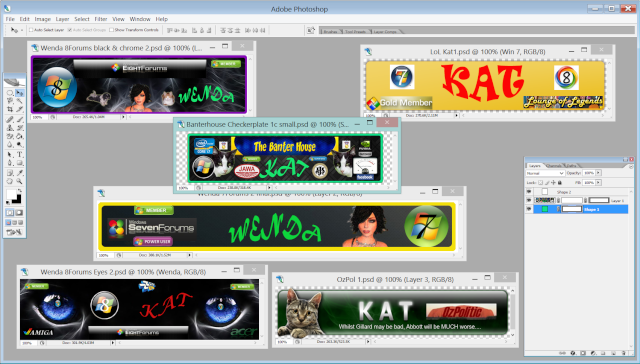
And here's a screen-shot of my PS, with some of my work loaded. It's funny now, but three weeks
ago, I couldn't have done these, or even known where to start.... Yes, there's a sig for OzPolitics
there, but you have to have a post-count of 10,000 to be allowed to use one. Most forums it's 100
or less.

Seriously, though, you'd have to be mad to pass up such a great score. 110% recommend!!

...
Back to top
« Last Edit: May 19th, 2013 at 6:21pm by Kat »  

...
 
IP Logged
 
moses
Gold Member
*****
Offline


Australian Politics

Posts: 6353
Re: Computer Free Software & Help Sites
Reply #19 - May 20th, 2013 at 3:19pm
 
Thanks for that Kat  Smiley

Jarte 5 Homepage   

...


1. A free word processor based on the Microsoft WordPad word processing engine built into Windows. 

2. A fast starting, easy to use word processor that expands well beyond the WordPad feature set. 

3. A small, portable, touch enabled word processor whose documents are fully compatible with Word and WordPad.


General Features
  • Fully compatible with Windows XP, Vista, 7, and 8
  • Tabbed interface to provide easy access to open documents
  • Opens files with file extension RTF, file extension DOC, and file extension DOCX
  • Fast start up
  • Small size, efficient operation, and compact display (great word processor for small screens)
  • Full touch screen support, including finger swipe scrolling, for Windows 8.
  • Hot Connect lets you use Jarte with other programs
  • Optional "Clickless Operation" feature greatly reduces clicking
  • Can be run as a portable word processor directly from a USB flash drive, CD, or DropBox folder
  • High quality spell checker with custom user dictionary
  • Included spelling dictionaries: English (American, British, & Canadian), Spanish, French, German, Italian, and Dutch
  • Link to, or import, your existing custom Word spelling dictionaries
  • Support for templates
  • Export to HTML or PDF
  • Single click bookmarking and bookmark navigation
  • Send documents via e-mail
  • Full drag and drop file support
  • Instant access to recently opened documents and folders
  • Instant access to documents and folders designated as favorites
  • Adjustable document zoom
  • Detailed Help documentation


    Editing Functions
  • Insert pictures, hyperlinks, tables, page breaks, equations and other embeddable objects
  • Quick Clips option provides easy copy, cut and paste capability using the mouse scroll wheel button
  • Standard clipboard functions plus a Paste Plain function which strips HTML and RTF formatting from clipboard text before pasting
  • Multi-level undo and redo functions
  • Sorting


    Font Formatting
  • Bold, italic, underline, strikeout, subscript, and superscript font styles
  • Choice of text colors
  • Text highlight tool with choice of colors
  • Font typeface selection box which displays each font choice in its own typeface
  • Choose your own default font
  • Quick access to your personally chosen favorite fonts and to recently used fonts
  • Format brush tool quickly applies font styling to text


    Paragraph Formatting
  • Left, right, centered, and justified text alignment
  • Paragraph indentation including first line and hanging indent styles
  • Bulleted and numbered list styles
  • Single, one and a half, and double line spacing
  • Optional paragraph spacing before and after paragraphs
  • Support for left, right, center, and decimal aligned tab stops
  • Format brush tool quickly applies formatting to paragraphs


    Printing
  • Print preview
  • User definable page margins
  • Reverse page order option and odd or even pages only options (useful for double sided printing) in addition to the standard print options
  • Visual designer allows complete control of both headers and footers:
  • Define any combination of left side, right side, and center headers and footers
  • Headers and footers may contain any combination of page numbering, file date, current date (in choice of date formats), file name, and user definable text
  • User control of the font typeface, font size, font style, and font color used for headers and footers
  • User control of the positioning of the header and footer lines
  • Optional suppression of the header and/or footer on the first page


    Tools
  • Clip List allows you display and reuse the 25 most recent clipboard clips
  • Screen capture tool for copying images from the screen
  • Special Characters Keyboard allows single click insertion of any character including the extended characters not shown on your keyboard
  • Reference Bar provides instant word lookup to online dictionary, thesaurus, and encyclopedia
  • The Reference Bar also automatically integrates with the WordWeb dictionary and thesaurus if it is installed
  • Document word count tool
Search for files on your computer with direct access to the system file search tool

Download Jarte Setup Here

Download Portable Version Here

Back to top
« Last Edit: May 20th, 2013 at 4:04pm by moses »  
 
IP Logged
 
moses
Gold Member
*****
Offline


Australian Politics

Posts: 6353
Re: Computer Free Software & Help Sites
Reply #20 - May 21st, 2013 at 6:08pm
 
Glary Utilities 2.55.0.1790 Homepage

...


Glary Utilities Free
  • Optimize,clean and boost the speed of your Windows.
  • Protect your privacy and security.
  • Block spyware, trojans, adware, etc
  • Fix certain application errors.
  • Simple, fast and User friendly interface
  • For only private use

    One Click A Day For PC Maintenance, Keeps Any PC Problems Away. With millions of worldwide users, the first-rank & free Glary Utilities is an INDISPENSABLE friend for your PC, with its 100% safe, thorough & quick cleaning and worry-free restoration. Glary Utilities is the best free system optimizer including registry repair, disk cleanup, memory optimization, windows startup manager, file security, privacy protection, Internet history eraser, performance accelerator and many other amazing multifunctional tools that are well organized on its simple interface. It is a totally safe and free system utility to fix dogged registry errors, wipe off clutters, free up disk space, optimize internet speed, safeguard confidential files and improve your system with the best performance.

    Glary Utilities is one-stop-shop freeware designed for both novice and professionals to optimize computer performance. User-friendly interface shows clear & detailed directions. For novice, all work can be done with just 1 or 2 clicks, while for professionals, abundant options are available. It provides One-click Maintenance and well-organized modules which focus on other aspects of system optimization.

    To solve slow Windows boot, fix PC errors, free up more disk space, or erase tracks? Glary Utilities is definitely the most helpful and will drastically improve your computer performance. It will become your INDISPENSABLE friend with its one-stop-shop utilities for system optimization for best performance. In addition, Glary Utilities can also recover deleted files, encrypt files for privacy protection and split/join large files for faster file transfer. Millions of users have chosen Glary Utilities for a reason, and you will also find it unparallelled to speed up computer performance and make your work more efficiently. The following are brief introductions to this one-stop-shop system utility:

    One-click Maintenance

    Glary Utilities provides an always-on, automated, all-in-one PC care service just by one click, including quick and thorough scan for issues like invalid registry keys, dangling shortcuts, unnecessary startup items, junk of temporary files, Internet history and spyware. Then a second click on "Repair Problems" and you can speed up system performance a great deal. One-click Maintenance makes it easy to optimize system immediately and doesn't bother you with multiple steps.

    Clean Up & Repair Module
  • Disk Cleaner - Removes junk data from your disks and recovers disk space.
  • Registry Cleaner - Scans and cleans up your registry to improve your system's performance.
  • vShortcuts Fixer - Corrects the errors in your startmenu & desktop shortcuts.
  • Uninstall Manager - Uninstalls programs completely that you don't need any more.

    Optimize & Improve Module
  • Startup Manager - Manages programs which run automatically on startup.
  • Memory Optimizer - Monitors and optimizes free memory in the background.
  • Context Menu Manager - Manages the context-menu entries for files, folders...
  • Registry Defrag - Defrag the Windows registry to speed up your computer.

    Privacy & Security Module
  • vTracks Eraser - Erases all the traces,evidences,cookies,internet history and more.
  • File Shredder - Erases files permanently so that no one can recover them.
  • File Undelete - Quick and effective way to retrieve accidentally deleted files.
  • File Encrypter and Decrypter - Protects your files from unauthorized access and use.

    Files & Folders Module
  • Disk Analysis - Shows you the disk space usage of your files and folders.
  • Duplicate Files Finder - Searches for space-wasting and error producing duplicate files.
  • Empty Folders Finder - Finds and removes empty folders in your windows.
  • File Splitter and Joiner - Splits large files into smaller manageable files, and then rejoin them.

    System Tools Module
  • Process Manager - Monitors programs that run on your PC and stop spyware and Trojans.
  • Internet Explorer Assistant - Manages Internet Explorer Add-ons and restores hijacked settings.
  • System Information - Collects information about your hardware and software.
  • Windows Standard Tools - Provides direct access to the useful windows default functions.

    Download Page Here

Back to top
 
 
IP Logged
 
moses
Gold Member
*****
Offline


Australian Politics

Posts: 6353
Re: Computer Free Software & Help Sites
Reply #21 - May 22nd, 2013 at 4:01pm
 
HTTrack WebSite Copier 3.47-13
Homepage

...


HTTrack HTTrack is an easy-to-use offline browser utility. It allows you to download a World Wide website from the Internet to a local directory, building recursively all directories, getting html, images, and other files from the
server to your computer. HTTrack arranges the original site's relative link-structure. Simply open a page of the "mirrored" website in your browser, and you can browse the site from link to link, as if you were viewing it online. HTTrack can also update an existing mirrored site, and resume interrupted downloads. HTTrack is fully configurable, and has an integrated help system.

Download Page Here
Back to top
 
 
IP Logged
 
lisa.greek
Gold Member
*****
Offline


Australian Politics

Posts: 1595
Cairns QLD
Re: Computer Free Software & Help Sites
Reply #22 - May 23rd, 2013 at 11:49am
 
Does anyone have a free Antivirus suggestion for my MacBook Pro?
Back to top
 
 
IP Logged
 
moses
Gold Member
*****
Offline


Australian Politics

Posts: 6353
Re: Computer Free Software & Help Sites
Reply #23 - May 23rd, 2013 at 2:45pm
 
Hello lisa.greek I am a Windows man, don't know much about Mac etc. Hope this is of some help to you.

avast! Free Antivirus for Mac Homepage

...

avast! offers the most Mac OS security features for FREE.

Protect yourself from Mac-specific malware with our light, fast, award-winning antivirus

Certified antivirus and anti-spyware engine: Our scanning engine's unique technologies protect against viruses, spyware, and other malicious agents.

WebRep plugin to help protect against phishing scams: WebRep browser plugins provide greater protection against phishing sites, including heuristic detection of new phishing sites.

Three types of real-time malware scans: Run real time malware scans on your file system, email tools, and web-browsing activities (web pages, downloads, and java scripts).

Download Avast Free Antivirus for Mac Here
Back to top
 
 
IP Logged
 
moses
Gold Member
*****
Offline


Australian Politics

Posts: 6353
Re: Computer Free Software & Help Sites
Reply #24 - May 23rd, 2013 at 2:47pm
 
CD Recovery Toolbox Free 2.0 Homepage

...

Recover files from damaged or corruptedCD/DVD/HD DVD/Blu-Ray disks

CD Recovery Toolbox Free - repair damaged CD disks

CD Recovery Toolbox (download, mirror) tool was developed for recovering damaged files from different disk types: CD, DVD,HD DVD, Blu-Ray, etc. You can use it to restore information lost as a result of some mechanical damage of the disk (scratches, chips, different spots on thesurface) or as a result of incorrect recording. Thus, the program can recoverdata that was considered lost. The CD Recovery Toolbox Free tool scans any CD and DVD disks and finds files and folders located there. We should mention that there can be some information on the disk that cannot berecovered. Not all of the files and folders can be found - that depends on the degree and location of the damage. Therefore, the CD Recovery Toolbox Free tool finds the possible maximum amount of information. After that, it shows a list of all files and folders available for recovery. Now the user can select the files and folders to be recovered. Those specific objects will be recovered while the others will be ignored. The program recovers the maximum amount of information in the damaged file. This reduces the risk of data loss considerably.

Download CD Recovery Toolbox Free 2.0 Here
Back to top
 
 
IP Logged
 
Lord Herbert
Gold Member
*****
Offline


Posts: 34441
Gender: male
Re: Computer Free Software & Help Sites
Reply #25 - May 23rd, 2013 at 5:36pm
 
Aussie wrote on May 13th, 2013 at 6:36pm:
moses wrote on May 13th, 2013 at 6:19pm:
It's not hard Aussie, most programmes / applications have pretty good help files.


See, the thing is Moses, Old Bastards like me are afraid of that stuff......like, if I actually do register for them or "download" them, what other bugs am I allowing into my Computer.  Chard posted about some photo storing thing.  I want to be able to post photos on Forums, but I never take the last step of signing up out of fear that I may have provided a key into my www bank stuff.


Shouldn't that read ....

" ... but I never take the last step of signing up out of fear that I may have provided a key into my www porn stuff".

Back to top
 
 
IP Logged
 
Kat
Gold Member
*****
Offline


Socialism IS the answer.

Posts: 17709
Everywhere and no-where
Gender: female
Re: Computer Free Software & Help Sites
Reply #26 - May 24th, 2013 at 9:40am
 
Lord Herbert wrote on May 23rd, 2013 at 5:36pm:
Aussie wrote on May 13th, 2013 at 6:36pm:
moses wrote on May 13th, 2013 at 6:19pm:
It's not hard Aussie, most programmes / applications have pretty good help files.


See, the thing is Moses, Old Bastards like me are afraid of that stuff......like, if I actually do register for them or "download" them, what other bugs am I allowing into my Computer.  Chard posted about some photo storing thing.  I want to be able to post photos on Forums, but I never take the last step of signing up out of fear that I may have provided a key into my www bank stuff.


Shouldn't that read ....

" ... but I never take the last step of signing up out of fear that I may have provided a key into my www porn stuff".


How's about we keep this sort of thing
off this thread, eh?

It's for posting and discussing useful programs, it's not a debate/argument thread.
Back to top
 

...
 
IP Logged
 
moses
Gold Member
*****
Offline


Australian Politics

Posts: 6353
Re: Computer Free Software & Help Sites
Reply #27 - May 24th, 2013 at 1:46pm
 
BurnAware Free 6.2 Homepage

...

BurnAware Free is a full-fledged, easy-to-use, free burning software which allows users to write all types of files such as digital photos, pictures, archives, images, documents, music and videos to CDs, DVDs and Blu-ray Discs.

Burn
  • Burn, backup or copy your files to CD, DVD or Blu-ray Discs.
  • Supports recording from command-line and BAT scripts for automating routine actions.
  • Supports CD-R/RW, DVD-R/RW, DVD+R/RW, BD-R/RE and DVD-RAM media, including high-capacity double-layer media.
  • Supports UDF (Universal Disc Format 1.02-2.60), Bridge and ISO9660 (Level 1-3, Romeo), including Joliet Unicode extensions.
  • Append or update Multisession discs.
  • Supports multisession for DVD-RW/+RW and import of any session.
  • Burn standard or boot disc images.
  • Supports ISO and CUE/BIN image files.

    Create
  • Create Bootable CD or DVD. Use it as a very big floppy boot disc for recovery purposes.
  • El Torito creation support with advanced options: emulation type, sectors, platform, load segment and boot message.
  • Create Audio CDs. Play a CD on your traditional CD player or car stereo.
  • Supports MP3, WAV, WMA, OGG, M4A, AAC and FLAC audio formats and M3U playlists.
  • Supports title and track CD-Text, including Unicode.
  • Create DVD-Video discs and MP3 CDs/DVDs.
  • Make standard or boot disc images.
  • Supports ISO and CUE/BIN image files.
  • Supports UDF (Universal Disc Format 1.02-2.60), Bridge and ISO9660 (Level 1-3, Romeo), including Joliet Unicode extensions.

    Copy
  • Copy disc to ISO image. This feature can be used for disc backup, as well as for disc copying.

    And more...
  • Erase. Erase or format rewritable disc.
  • Verify. Check disc for read errors.

    Benefits:
  • Lowest CPU usage while burning and copying
  • Easiest-to-use, multilingual user interface
  • On-the-fly burning
  • Supports all types of optical drives and discs
  • Uses the most fastest and stable burning engine
  • Supports all major audio and disc image formats
  • Does not require the .NET framework or additional drivers
  • Supports Windows 8 and Windows XP/Vista/7 (both 32 and 64-bit)


Download BurnAware Free 6.2 Here
Back to top
 
 
IP Logged
 
moses
Gold Member
*****
Offline


Australian Politics

Posts: 6353
Re: Computer Free Software & Help Sites
Reply #28 - May 26th, 2013 at 2:01pm
 
ToolWiz Time Freeze 2.1 Homepage

...

Toolwiz Time FreezeToolWiz Time Freeze is an effective Instant System Restore software to keep your computer system safe and protect your computer from undesired changes. It can also protect your files and folders from changes with a secure password protection. It makes virtualization very easy to use. Basically, it clones your system, creating fully working copies that you can use normally (or abnormally) without risking your "real" system. It puts the actual system under secure protection and creates a virtual environment for system partition, on which you then run applications and surf the internet. It provides higher-level security to computer protection, and greatly improves the efficiency of virtual systems.

ToolWiz Time Freeze has a simple interface for starting and stopping its main features as well as adding files to the File Protection feature (Time Freeze warns not to include Windows system files). There's a small, optional "ToolBar" that merely displays the program's status on the desktop, but it's helpful if you switch between modes a lot. Most of the time, the program's system tray icon handles all the actions.

How is it Different?
  • Protects your files and folders from unwanted changes and provides password protection;
  • Keeps System Safe from threats of virus, spyware, worm, Trojan, etc.;
  • Enter and Exit Virtual System with a single click, no need to reboot computer;
  • Easy System Restore and Recovery to remove unwanted changes;
  • Adding files to the File Protection Feature;
  • New Protection Mode greatly improves efficiency of virtual system.

    System Protection
  • Puts the actual system under protection and creates a virtual environment for system partition. Creates a virtual environment as a copy of the real system and keeps the actual system in a constant state. prevents computer from unwanted changes and prevent malicious threats being made and doing harm to your computer, on which you run applications and surf the internet and perform online activities.
  • Start up system protection. Prevents malicious threats being made and doing harm to your computer.it puts the actual system under protection and creates a virtual environment for system partition
  • Simply reboot to restore your system to the previous state. Keep the actual system in a constant state, keep your system safe and protect your computer from unwanted changes.
  • Don't reboot to accept all the changes. It will take several minutes to save the changes to your real system.

    Folder Protection
  • Help you to prohibit changing files by others.
  • Help you to prohibit accessing the protected folders by others.
  • Protects your files from being infected by viruses or stolen by trojans.
  • Tow protection modes about starting and stoping help you to prohibit changing files or accessing the protected folders by others.
  • Make sure the windows system files are not in the protection list.

    More Features
  • Very easy switch between virtual & real system
  • To enter virtual system, no need to reboot computer. To return to real system, just exit System Protection.


Download ToolWiz Time Freeze 2.1 Here


Back to top
« Last Edit: May 26th, 2013 at 2:10pm by moses »  
 
IP Logged
 
Kat
Gold Member
*****
Offline


Socialism IS the answer.

Posts: 17709
Everywhere and no-where
Gender: female
Re: Computer Free Software & Help Sites
Reply #29 - May 26th, 2013 at 9:59pm
 
Sounds interesting, Moses.

I'll be checking this one out.

Not so much for me, but for a mate, some of his friends can't use a PC at
all well, but use his and keep stuffing it up And I'm the poor muggins who
gets to fix their stuff-ups...  AngrySad
Back to top
 

...
 
IP Logged
 
Pages: 1 2 3 4 ... 16
Send Topic Print