Post by Lord Herbert on Feb 6th, 2016 at 7:37pm
John_Taverner wrote on Feb 6th, 2016 at 5:25pm:
|
I've run Belarc to find out what my computer's potential RAM capacity can be and how many slots there are - but it failed to tell me.
| Australian Politics Forum | |
|
http://www.ozpolitic.com/forum/YaBB.pl
General Discussion >> Technically Speaking >> What's your boot-up time? http://www.ozpolitic.com/forum/YaBB.pl?num=1454716486 Message started by Lord Herbert on Feb 6th, 2016 at 9:54am |
|
|
Title: What's your boot-up time? Post by Lord Herbert on Feb 6th, 2016 at 9:54am
It takes 90 seconds from starting my computer to arriving at OzPolitic.
How does this compare with yours? |
|
Title: Re: What's your boot-up time? Post by Sir Bobby on Feb 6th, 2016 at 10:08am
Herby - it depends on what programs are in your boot up list.
Get this: Advanced SystemCare Pro 9.1 http://download.cnet.com/Advanced-SystemCare-Pro/3000-2086_4-75628962.html It allows you to scan the boot up list & remove unnecessary programs to decrease boot up time. |
|
Title: Re: What's your boot-up time? Post by Sir Bobby on Feb 6th, 2016 at 10:13am
Forgot to add -
Advanced SystemCare Pro 9.1 allows you to do about 100 more things than stated above. It's a great program. |
|
Title: Re: What's your boot-up time? Post by Lord Herbert on Feb 6th, 2016 at 10:16am Bobby. wrote on Feb 6th, 2016 at 10:13am:
I've already got half-a-dozen programs that can 'disable' Startup programs. But I'll check it out any way. *** Oops - the reviews are very bad. I'll give it a miss, but thanks anyway. |
|
Title: Re: What's your boot-up time? Post by Sir Bobby on Feb 6th, 2016 at 10:24am Lord Herbert wrote on Feb 6th, 2016 at 10:16am:
Whatever you do - let your computer boot up fully - even leave for 3 minutes to let it do some basic house keeping before you use it. |
|
Title: Re: What's your boot-up time? Post by greggerypeccary on Feb 6th, 2016 at 10:29am 4 to 5 seconds. Chromebook - no windows, no bloatware. |
|
Title: Re: What's your boot-up time? Post by Lord Herbert on Feb 6th, 2016 at 11:02am greggerypeccary wrote on Feb 6th, 2016 at 10:29am:
Holy sh*t. But! I don't believe you. |
|
Title: Re: What's your boot-up time? Post by Baronvonrort on Feb 6th, 2016 at 11:04am Lord Herbert wrote on Feb 6th, 2016 at 9:54am:
Really quick with windows 10. You need more RAM Herbert, try msy computers they have good deals. |
|
Title: Re: What's your boot-up time? Post by Sir Bobby on Feb 6th, 2016 at 11:28am Lord Herbert wrote on Feb 6th, 2016 at 10:16am:
Disregard those silly reviews - it's the best thing since sliced bread. |
|
Title: Re: What's your boot-up time? Post by Lord Herbert on Feb 6th, 2016 at 11:31am Baronvonrort wrote on Feb 6th, 2016 at 11:04am:
More RAM - yes, I'm bustin' to get some more as soon as I can hustle a few coins together after having spent $1,300 on getting one of my trees removed. Someone here said get no more than 8GB - but Neferti has a whopping 16GB of RAM ... |
|
Title: Re: What's your boot-up time? Post by greggerypeccary on Feb 6th, 2016 at 11:42am Lord Herbert wrote on Feb 6th, 2016 at 11:02am:
I kid you not. Chromebooks don't have Windows or any other nonsense. It starts in about 2 seconds, and goes to my homepage within about 5 seconds. Best thing since sliced bread. "Newer Chromebooks have 5 second boot up time". http://www.ubergizmo.com/2012/04/newer-chromebooks-have-5-second-boot-up-time/ |
|
Title: Re: What's your boot-up time? Post by Baronvonrort on Feb 6th, 2016 at 11:48am Lord Herbert wrote on Feb 6th, 2016 at 11:31am:
I have 8Gb in my laptop with I7 processor it's fast, a desktop I am building will have 16Gb for work graphics. Get more ram and pay $10 bucks a year for Kaspersky from MSY then you can uninstall all those bullshit programs that are supposed to make your computer run better. |
|
Title: Re: What's your boot-up time? Post by Jovial Monk on Feb 6th, 2016 at 11:53am
My MacAir laptop takes 15 seconds, but five of those are wifi connecting to the router.
I have 4Gb RAM, enough for what I use it for now. My primary school teacher sister has a chromebook and loves it, said something about being able to enlarge parts of the screen. But I like Mac so after I physically destroyed my MacAir 11" I got a MacAir 13" and love it. Heavier than the 11" but that is the trade off. (When I had a glass of water in my hand the back of my office–type chair fell off and I ended up on my back on the floor. Very amusing—until I saw I had spilled water on the keyboard!) |
|
Title: Re: What's your boot-up time? Post by Lord Herbert on Feb 6th, 2016 at 12:14pm
I have 4GB of RAM and a 64x2 dual-core processor.
:) |
|
Title: Re: What's your boot-up time? Post by Sir Bobby on Feb 6th, 2016 at 12:19pm Lord Herbert wrote on Feb 6th, 2016 at 12:14pm:
4 GB is enough for most programs. I have 16 GB. |
|
Title: Re: What's your boot-up time? Post by Sprintcyclist on Feb 6th, 2016 at 12:57pm Lord Herbert wrote on Feb 6th, 2016 at 11:02am:
my bootup time is basically 0 seconds. THe Asus is set to go into sleep mode when I close the lid. Open the lid, press the mouse, put in password, it opens instantly to where I left it. |
|
Title: Re: What's your boot-up time? Post by greggerypeccary on Feb 6th, 2016 at 1:01pm Sprintcyclist wrote on Feb 6th, 2016 at 12:57pm:
That's from sleep. What about when it's completely off? Nothing boots as fast as a Chromebook, from 'off'. |
|
Title: Re: What's your boot-up time? Post by Neferti on Feb 6th, 2016 at 2:34pm Lord Herbert wrote on Feb 6th, 2016 at 11:31am:
I have a dedicated GAMES MACHINE brmm, brmm, brmm .... it has 32 Gigs of RAM and I have never, ever timed the boot-up time. Why would anybody even think of doing it?* *Sorry, is this a male "mine is bigger than yours" thing? Perhaps you should repost this in Redneck's Shed? ;D ;D |
|
Title: Re: What's your boot-up time? Post by Lord Herbert on Feb 6th, 2016 at 2:44pm Neferti wrote on Feb 6th, 2016 at 2:34pm:
Um, 'NO' Neferti - I sincerely wanted to know if my boot-up time is way too long to what it ought to be. I improved the Start-up speed when I discovered ... Start > Run > msconfig > Boot ... and then replace '30' (as I had it by default) - to 3 (seconds). Been happy ever since. :) |
|
Title: Re: What's your boot-up time? Post by Neferti on Feb 6th, 2016 at 2:58pm
Herb,
You can upgrade the RAM yourself. You will have to open the "tower" and see what sort of RAM you have and how many "slots" there are. No need to pay the local rip-off merchants to do it for you. Here is a link, with pictures, of how it can be done AND how do to it. http://www.wikihow.com/Install-RAM |
|
Title: Re: What's your boot-up time? Post by bogarde73 on Feb 6th, 2016 at 2:59pm
I run the System Mechanic Pro program and the boot time will depend on what actions it determines to carry out on start up from time to time - registry/diskcheck whatever.
But with none of that happening it might be 20 seconds. |
|
Title: Re: What's your boot-up time? Post by Lord Herbert on Feb 6th, 2016 at 3:18pm Neferti wrote on Feb 6th, 2016 at 2:58pm:
Thanks, Neferti. We did his before, if you remember. I opened up the PC and had a good look inside, but got discouraged for some reason (I can't remember). I'll have another go at it ... THIS time I'll take a photo and post it up here for your inspection. I'd really like to have a lot more grunt in my system than just a lousy 4GBs. That Family History project which I'm still on often comes up with a notice saying there isn't enough Memory to continue - and so I've had to do a whole lot of deleting here and there, and then re-boot with my fingers crossed. Damn nuisance. |
|
Title: Re: What's your boot-up time? Post by Lord Herbert on Feb 6th, 2016 at 3:20pm bogarde73 wrote on Feb 6th, 2016 at 2:59pm:
Wow. Not bad. As I've said - mine takes 90 seconds. |
|
Title: Re: What's your boot-up time? Post by Redneck on Feb 6th, 2016 at 3:30pm Lord Herbert wrote on Feb 6th, 2016 at 2:44pm:
That sounds a bit odd Herb, that 30second is only a timeout feature I think, which sets the time to shut down if booting fails. Anyway all good if it fixed it! |
|
Title: Re: What's your boot-up time? Post by Sprintcyclist on Feb 6th, 2016 at 4:28pm greggerypeccary wrote on Feb 6th, 2016 at 1:01pm:
You are probably quite correct regards a chromebook. |
|
Title: Re: What's your boot-up time? Post by Super Nova on Feb 6th, 2016 at 5:09pm
Windows 10, all solid state, 10 seconds and I have a lot in my startup. Allow it takes me 2 seconds to type in my password and I'm pretty happy.
|
|
Title: Re: What's your boot-up time? Post by John_Taverner on Feb 6th, 2016 at 5:21pm Super Nova wrote on Feb 6th, 2016 at 5:09pm:
Do you have other computers networked ? I suspect it would take much longer if you did. |
|
Title: Re: What's your boot-up time? Post by John_Taverner on Feb 6th, 2016 at 5:25pm Lord Herbert wrote on Feb 6th, 2016 at 3:18pm:
Just be careful to get the right RAM for your computer, and make sure that it's matched. I've done it myself, but make sure you research it all properly. |
|
Title: Re: What's your boot-up time? Post by John Smith on Feb 6th, 2016 at 5:47pm Lord Herbert wrote on Feb 6th, 2016 at 3:18pm:
4 GB of ram should be plenty, it's all I have and I run my business programmes with it. How much porn do you watch exactly that you need more ram? |
|
Title: Re: What's your boot-up time? Post by Lord Herbert on Feb 6th, 2016 at 7:32pm John Smith wrote on Feb 6th, 2016 at 5:47pm:
Would you rather drive a 4-cylinder Datsun 180B or a 6-cylinder Mercedes-Benz 300SD? Every time I change pages or go to a website - the spinning wheel that tells me it's searching - and then fetching it - makes me wait far too long. |
|
Title: Re: What's your boot-up time? Post by Lord Herbert on Feb 6th, 2016 at 7:37pm John_Taverner wrote on Feb 6th, 2016 at 5:25pm:
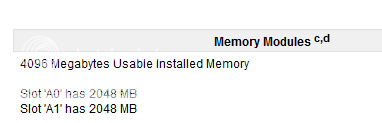
I've run Belarc to find out what my computer's potential RAM capacity can be and how many slots there are - but it failed to tell me. |
|
Title: Re: What's your boot-up time? Post by greggerypeccary on Feb 6th, 2016 at 7:53pm Lord Herbert wrote on Feb 6th, 2016 at 7:37pm:
The only reliable way to tell is by opening it up and looking. |
|
Title: Re: What's your boot-up time? Post by Wolseley on Feb 6th, 2016 at 8:03pm
I can't say that I've ever bothered checking to see how long it takes. It also depends on whether I left anything open when I shut the computer down the last time, which I do sometimes.
If I remember, I might time it next time I turn it on. |
|
Title: Re: What's your boot-up time? Post by Lord Herbert on Feb 6th, 2016 at 8:15pm Wolseley wrote on Feb 6th, 2016 at 8:03pm:
Good on you, Wolseley - let us know. |
|
Title: Re: What's your boot-up time? Post by Kat on Feb 6th, 2016 at 8:29pm
Don't sweat over a 90 second boot time, especially if you are only running a 5400rpm hard drive (as I am - it's big, but not fast).
Even the super-lappy takes around 90-100 seconds, and it's got plenty of RAM and CPU/GPU power. |
|
Title: Re: What's your boot-up time? Post by John Smith on Feb 6th, 2016 at 8:48pm Lord Herbert wrote on Feb 6th, 2016 at 7:32pm:
it's not your ram, it's your crap ... mine moves along just fine |
|
Title: Re: What's your boot-up time? Post by Wolseley on Feb 6th, 2016 at 10:09pm Lord Herbert wrote on Feb 6th, 2016 at 8:15pm:
94 seconds. |
|
Title: Re: What's your boot-up time? Post by Lord Herbert on Feb 7th, 2016 at 10:44am Wolseley wrote on Feb 6th, 2016 at 10:09pm:
Pretty much the same as mine. By all accounts, that's not too slow. |
|
Title: Re: What's your boot-up time? Post by John_Taverner on Feb 7th, 2016 at 1:15pm Lord Herbert wrote on Feb 6th, 2016 at 7:37pm:
All you need is the MoBo documentation. Look up RAM. |
|
Title: Re: What's your boot-up time? Post by Lord Herbert on Feb 7th, 2016 at 2:12pm John_Taverner wrote on Feb 7th, 2016 at 1:15pm:
Uh-ha. link I'm getting closer to the Big Day when I slam in 2x 4GB RAMs cards/sticks. |
|
Title: Re: What's your boot-up time? Post by Neferti on Feb 7th, 2016 at 2:31pm Lord Herbert wrote on Feb 7th, 2016 at 2:12pm:
Herb, Something I forgot to mention when talking about RAM. If your computer only has a 32 bit system, the MAXIMUM amount of RAM you can have is 4Gigs. I think from memory you have Windows 7 but I can't recall whether you have 32 or 64 bit system. If you have a 64 bit system, stick as much RAM as you want, but adding more than 4 GB RAM in a 32 bit system is a waste of money. http://answers.microsoft.com/en-us/windows/forum/windows_7-hardware/maximum-ram-for-windows-7-32-bit/4286bbfa-6851-e011-8dfc-68b599b31bf5?auth=1 |
|
Title: Re: What's your boot-up time? Post by Lord Herbert on Feb 7th, 2016 at 3:25pm Neferti wrote on Feb 7th, 2016 at 2:31pm:
I would marry you if I had the money. :-* Thank you, Neferti - the Gods have smiled upon me - I do have a 64-bit operating system. I'm going to go for 8GB of RAM. |
|
Title: Re: What's your boot-up time? Post by Kat on Feb 7th, 2016 at 10:07pm Lord Herbert wrote on Feb 7th, 2016 at 2:12pm:
8 is great. 16 is sublime... Any more than that, except in a hard-core gaming machine, is overkill. |
|
Title: Re: What's your boot-up time? Post by Lord Herbert on Feb 8th, 2016 at 7:38am Kat wrote on Feb 7th, 2016 at 10:07pm:
16 would be better for me than 8? Hmm. I'll check out the prices first. And then I'll need more cooling fans I suppose? |
|
Title: Re: What's your boot-up time? Post by Neferti on Feb 8th, 2016 at 11:11am Lord Herbert wrote on Feb 8th, 2016 at 7:38am:
Try the 8 Gigs of RAM first, Herb. After having only 4 Gigs if you got 16 you would need a seat-belt to keep you from crashing head first into the monitor. ;) /joke ;D ;D |
|
Title: Re: What's your boot-up time? Post by Lord Herbert on Feb 8th, 2016 at 12:20pm Neferti wrote on Feb 8th, 2016 at 11:11am:
;D err .. yes. 2 x 4GB 'devices' should fit the bill very noicely, thank youse. |
|
Title: Re: What's your boot-up time? Post by Neferti on Feb 8th, 2016 at 4:29pm Lord Herbert wrote on Feb 8th, 2016 at 12:20pm:
>:( Someone over <--------------- spells it "you's". Both are incorrect as you well know. ::) Back on topic, I am not sure what 2 x4GB will cost, but a lot cheaper than getting the local "computer shop" to do it for you. |
|
Title: Re: What's your boot-up time? Post by MumboJumbo on Feb 8th, 2016 at 4:42pm Kat wrote on Feb 6th, 2016 at 8:29pm:
And if you're really after fast boot up times, you'll want a SSD instead of/in addition to your normal hdd. Then you'll need to copy windows -> the new ssd. In all honesty, why not just put the sucker on standby? Then it'll be ready to go in 3-4 seconds next time? |
|
Title: Re: What's your boot-up time? Post by Neferti on Feb 8th, 2016 at 4:48pm MumboJumbo wrote on Feb 8th, 2016 at 4:42pm:
Please don't confuse Herbie, Mumbo Jumbo. ;D |
|
Title: Re: What's your boot-up time? Post by Super Nova on Feb 8th, 2016 at 5:32pm MumboJumbo wrote on Feb 8th, 2016 at 4:42pm:
Mumbo is correct, you need SSD, solid state disk. That is how the boot times are improved these days. At least an SSD for your C Drive and a fast bus between them. |
|
Title: Re: What's your boot-up time? Post by Lord Herbert on Feb 8th, 2016 at 7:33pm Neferti wrote on Feb 8th, 2016 at 4:29pm:
Youse got THAT right, baby-doll! No ways I'm gonna shell out $150 for them crackers to push a couple of racks into the slots. |
|
Title: Re: What's your boot-up time? Post by Lord Herbert on Feb 8th, 2016 at 7:37pm MumboJumbo wrote on Feb 8th, 2016 at 4:42pm:
Thanx Mumbo, but my startup speed no longer pisses me off now that I've reduced the 30 second countdown, and then AGAIN another 30 second countdown that was part of the boot up. Incidentally, since Day One when I first bought this PC unit it has never been able to switch to Safe Mode at Startup by me tapping the F8 key. |
|
Title: Re: What's your boot-up time? Post by Lord Herbert on Feb 8th, 2016 at 7:41pm Neferti wrote on Feb 8th, 2016 at 4:48pm:
|
|
Title: Re: What's your boot-up time? Post by Redneck on Feb 8th, 2016 at 7:45pm
I plan to do a scientific test on this herb
Boot until logged in with password at lightning speed, Then start up Task manager CTRL ALT DEL and watch until HDD activity settles down. The only real test! Owzat? |
|
Title: Re: What's your boot-up time? Post by Kat on Feb 8th, 2016 at 9:57pm MumboJumbo wrote on Feb 8th, 2016 at 4:42pm:
|
|
Title: Re: What's your boot-up time? Post by The Grappler on Feb 8th, 2016 at 10:49pm
About two minutes... the security needs to check out everything.... longer if I force shut down instead of waiting. Then it checks everything twice to be sure...
|
|
Title: Re: What's your boot-up time? Post by Lord Herbert on Feb 9th, 2016 at 6:04am Sir Grappler Truth Teller OAM wrote on Feb 8th, 2016 at 10:49pm:
As once advised, I've cancelled all Real Time security checking and automatic updating for these slowing page loading throughout each day. |
|
Title: Re: What's your boot-up time? Post by Black Orchid on Feb 9th, 2016 at 12:12pm
Since I started using a laptop I don't turn it off anymore. I just close the lid and let it 'sleep'. Then every few days I do a restart.
|
|
Title: Re: What's your boot-up time? Post by Neferti on Feb 9th, 2016 at 3:47pm Black Orchid wrote on Feb 9th, 2016 at 12:12pm:
I tend to do the same with my Toshiba laptop. My brmm brmm Gamer Desktop (with 32 Gigs of RAM) I tend to leave on all the time, and re-boot periodically. Never gets overheated. ;) |
|
Title: Re: What's your boot-up time? Post by Kat on Feb 10th, 2016 at 2:01am Super Nova wrote on Feb 8th, 2016 at 5:32pm:
I don't like buses, I think I'll take the train. ;) ;) :P :o |
|
Title: Re: What's your boot-up time? Post by Redneck on Feb 11th, 2016 at 8:43am
I solved my slow boot up time on my Laptop by replacing my 484Gb HDD with a 1TB Hybrid HDD/SSD Drive and using a simple clone drive program
http://www.ozpolitic.com/forum/YaBB.pl?num=1448684991 Quote:
http://www.pcworld.com/article/2012223/hybrid-hard-drives-how-they-work-and-why-they-matter.html It now starts like a new one Some suggested the fact that the new drive being a 1TB which operate faster may have had a lot to do with the result, either way a relatively cheap solution that has worked wonders |
|
Title: Re: What's your boot-up time? Post by Redneck on Feb 11th, 2016 at 8:53am
My 1TB Hybrid HDD/SSD Drive cost $115.
|
|
Australian Politics Forum » Powered by YaBB 2.5.2! YaBB Forum Software © 2000-2026. All Rights Reserved. |