Australian Politics Forum
http://www.ozpolitic.com/forum/YaBB.pl
General Discussion >> Technically Speaking >> Windows 11
http://www.ozpolitic.com/forum/YaBB.pl?num=1634945142

Message started by The Heartless Felon on Oct 23rd, 2021 at 9:25am

Title: Windows 11
Post by The Heartless Felon on Oct 23rd, 2021 at 9:25am
I've just been invited to download/install Windows 11. And it's free!

Anybody know anything about it?

Title: Re: Windows 11
Post by Redmond Neck on Oct 23rd, 2021 at 9:38am
https://docs.microsoft.com/en-us/windows/release-health/status-windows-11-21h2

Title: Re: Windows 11
Post by Marla on Oct 23rd, 2021 at 12:29pm

The Heartless Felon wrote on Oct 23rd, 2021 at 9:25am:
I've just been invited to download/install Windows 11. And it's free!

Anybody know anything about it?


I've been a "beta tester" since May. Had some minor problems with folders, start ups, and there was a while there is really slowed internet speed to a crawl. Micro$oft seems to have resolved these issues but it's really not much of an improvement. Micro$oft attempting to go for a iOS feel with center icons; the big push was that Windows 11 allegedly to get Android apps to work on a PC but that too has been delayed until mid 2022. Oh, and you need a "TPN" chip to run Windows 11 otherwise, no deal.

Title: Re: Windows 11
Post by The Heartless Felon on Oct 23rd, 2021 at 1:31pm

Marla wrote on Oct 23rd, 2021 at 12:29pm:

The Heartless Felon wrote on Oct 23rd, 2021 at 9:25am:
I've just been invited to download/install Windows 11. And it's free!

Anybody know anything about it?


I've been a "beta tester" since May. Had some minor problems with folders, start ups, and there was a while there is really slowed internet speed to a crawl. Micro$oft seems to have resolved these issues but it's really not much of an improvement. Micro$oft attempting to go for a iOS feel with center icons; the big push was that Windows 11 allegedly to get Android apps to work on a PC but that too has been delayed until mid 2022. Oh, and you need a "TPN" chip to run Windows 11 otherwise, no deal.


Thanks Marla. I've had a look at some of the changes and I don't see that there's much improvement for the occasional computer user like me.

Title: Re: Windows 11
Post by Marla on Oct 24th, 2021 at 4:35am
Most accurate "review" I could find

https://youtu.be/R2InZEvWco8

Title: Re: Windows 11
Post by Mr Hammer on Oct 24th, 2021 at 11:53pm
Every good Marxist must have one.

Title: Re: Windows 11
Post by Super Nova on Oct 26th, 2021 at 3:54pm
My work PC was updated last night to Windows 11.

I see no real difference but have not explored it.

It works. No issues so far.

Title: Re: Windows 11
Post by Jovial Monk on Oct 26th, 2021 at 4:48pm
Me, I LOVE my RISC laptop.

20 that is TWENTY hours of battery life!

Very LITTLE heat generated

Fast and responsive.

Apple always leading.

Title: Re: Windows 11
Post by rhino on Oct 26th, 2021 at 4:52pm

Super Nova wrote on Oct 26th, 2021 at 3:54pm:
My work PC was updated last night to Windows 11.

I see no real difference but have not explored it.

It works. No issues so far.

I always hated those work updates, most of the time there was stuff that went missing on your hardrive or it was incompatible with some other bit of software and you end up reinstalling all the drivers.

Title: Re: Windows 11
Post by Kat on Oct 28th, 2021 at 7:38am
Not a big fan.

Mainly because my four-year-old, top-shelf i7 laptop won't run it
because its CPU isn't supported.

I'm understandably reluctant to spend another $2000+ for a new
computer when this one is still in good working order.

And yes - I DO need a high-end (therefore expensive) laptop due
to the fact that I do a lot of video editing, much of it in 4K, which
does require a powerful machine with decent graphics capability.

Not_a_huge_fan.jpg (32 KB | 26 )

Title: Re: Windows 11
Post by Sir Spot of Borg on Oct 28th, 2021 at 7:48am

rhino wrote on Oct 26th, 2021 at 4:52pm:

Super Nova wrote on Oct 26th, 2021 at 3:54pm:
My work PC was updated last night to Windows 11.

I see no real difference but have not explored it.

It works. No issues so far.

I always hated those work updates, most of the time there was stuff that went missing on your hardrive or it was incompatible with some other bit of software and you end up reinstalling all the drivers.


Invariably it resets some obscure setting you have to hunt down to fix

Spot

Title: Re: Windows 11
Post by Carl D on Oct 28th, 2021 at 9:04am

Kat wrote on Oct 28th, 2021 at 7:38am:
Not a big fan.

Mainly because my four-year-old, top-shelf i7 laptop won't run it
because its CPU isn't supported.

I'm understandably reluctant to spend another $2000+ for a new
computer when this one is still in good working order.

And yes - I DO need a high-end (therefore expensive) laptop due
to the fact that I do a lot of video editing, much of it in 4K, which
does require a powerful machine with decent graphics capability.


Have to agree there, Kat.

I have 2 desktop PC's here, one with an older 4th Generation Intel i3-4160 CPU (Haswell) and the other with a 7th Generation Intel i5-7600 CPU (Kaby Lake) and neither of them will (officially) run Windows 11.

There are ways to 'force' the installation of Windows 11 on unsupported hardware but there's no guarantee it will work and then no guarantee that Microsoft will allow updates if you do get it to work.

I also have a little Lenovo laptop that I bought about 4 months back which I could run Windows 11 on since the CPU is on the supported list and it also has a TPM (Trusted Platform Module) built in (which is another of the requirements) but I really can't be bothered installing 11 at the moment. I do have Macrium Reflect image backups of both desktop PC's and the laptop so it isn't a problem to quickly go back to Windows 10 if something goes wrong trying to install 11.

Nah... stuff it... I'll stay with 10 for the moment, thanks. I also believe this whole 'unsupported hardware' BS is just another ploy with Microsoft and the hardware manufacturers trying to get people to buy or build new PC's just to run Microsoft's latest Windows version.

And, Microsoft does have prior 'form' with things like this - they 'artificially'stopped Windows 7 being installed on 7th Generation and above CPU's back in 2017 when they were pushing Windows 10 hard. Actually, they didn't stop Windows 7 being installed but they stopped people getting Windows Updates for Windows 7 with these processors (but, as always, there were/are still ways of getting around that as well).

Title: Re: Windows 11
Post by Kat on Oct 28th, 2021 at 6:06pm

Carl D wrote on Oct 28th, 2021 at 9:04am:

Kat wrote on Oct 28th, 2021 at 7:38am:
Not a big fan.

Mainly because my four-year-old, top-shelf i7 laptop won't run it
because its CPU isn't supported.

I'm understandably reluctant to spend another $2000+ for a new
computer when this one is still in good working order.

And yes - I DO need a high-end (therefore expensive) laptop due
to the fact that I do a lot of video editing, much of it in 4K, which
does require a powerful machine with decent graphics capability.


Have to agree there, Kat.

I have 2 desktop PC's here, one with an older 4th Generation Intel i3-4160 CPU (Haswell) and the other with a 7th Generation Intel i5-7600 CPU (Kaby Lake) and neither of them will (officially) run Windows 11.

There are ways to 'force' the installation of Windows 11 on unsupported hardware but there's no guarantee it will work and then no guarantee that Microsoft will allow updates if you do get it to work.

I also have a little Lenovo laptop that I bought about 4 months back which I could run Windows 11 on since the CPU is on the supported list and it also has a TPM (Trusted Platform Module) built in (which is another of the requirements) but I really can't be bothered installing 11 at the moment. I do have Macrium Reflect image backups of both desktop PC's and the laptop so it isn't a problem to quickly go back to Windows 10 if something goes wrong trying to install 11.

Nah... stuff it... I'll stay with 10 for the moment, thanks. I also believe this whole 'unsupported hardware' BS is just another ploy with Microsoft and the hardware manufacturers trying to get people to buy or build new PC's just to run Microsoft's latest Windows version.

And, Microsoft does have prior 'form' with things like this - they 'artificially'stopped Windows 7 being installed on 7th Generation and above CPU's back in 2017 when they were pushing Windows 10 hard. Actually, they didn't stop Windows 7 being installed but they stopped people getting Windows Updates for Windows 7 with these processors (but, as always, there were/are still ways of getting around that as well).


I will definitely be investigating this, and as for getting updates I'm not
that worried. My XP, Win 7 and Vista Ultimate systems get by just fine
without them.

My current machine is an ASUS ROG GL753 gaming laptop with an i7
7700 @ 2.8Ghz, an SSD and a 1TB spinner HD, a 17" screen and a 4
gig Nvidia GeForce graphics setup.

It's patently ridiculous that this setup 'can't' run Win 11.

Title: Re: Windows 11
Post by Valkie on Oct 28th, 2021 at 6:09pm
I have found windows 10 to be the worst  virus I have ever had on my computer.
As bad a millennium they brought out, and quickly scrapped, several years ago.

Windows 7 seemed to be the most responsive and functional I have used.
But it didn't have the necessary ability to download everything on your computer while it's pretending to be updating.

This continual updating is a serious PITA,  I turn mine off and once a month I update.
It takes hours and there is never any improvement, usually I have to do a few fixes afterward.

If only the actually released a functional and fast platform.
But the geeks and boffins just out of school now have no idea how to make it work properly.

Wait until Windows 13.
It will be gender neutral and you will be required to name all 72 genders before you can log on.

Title: Re: Windows 11
Post by Kat on Oct 28th, 2021 at 6:14pm

Valkie wrote on Oct 28th, 2021 at 6:09pm:
I have found windows 10 to be the worst  virus I have ever had on my computer.
As bad a millennium they brought out, and quickly scrapped, several years ago.

Windows 7 seemed to be the most responsive and functional I have used.
But it didn't have the necessary ability to download everything on your computer while it's pretending to be updating.

This continual updating is a serious PITA,  I turn mine off and once a month I update.
It takes hours and there is never any improvement, usually I have to do a few fixes afterward.

If only the actually released a functional and fast platform.
But the geeks and boffins just out of school now have no idea how to make it work properly.

Wait until Windows 13.
It will be gender neutral and you will be required to name all 72 genders before you can log on.


I certainly hope not, but you never know, do you? :P :)

Title: Re: Windows 11
Post by greggerypeccary on Oct 28th, 2021 at 6:41pm

I haven't used Windows for personal computing for 7 or 8 years now.

I just see no need for it.


Title: Re: Windows 11
Post by Setanta on Oct 28th, 2021 at 8:05pm

greggerypeccary wrote on Oct 28th, 2021 at 6:41pm:
I haven't used Windows for personal computing for 7 or 8 years now.

I just see no need for it.


I haven't since win 3.11. OS/2 until '95 or '96, Debian(Linux) from 1996 and until present.

Let me guess, you are a late sipping Mac user? ;)

Edit: meh, stupid image link. Removed.

Title: Re: Windows 11
Post by greggerypeccary on Oct 28th, 2021 at 10:26pm

Setanta wrote on Oct 28th, 2021 at 8:05pm:

greggerypeccary wrote on Oct 28th, 2021 at 6:41pm:
I haven't used Windows for personal computing for 7 or 8 years now.

I just see no need for it.


I haven't since win 3.11. OS/2 until '95 or '96, Debian(Linux) from 1996 and until present.

Let me guess, you are a late sipping Mac user? ;)

Edit: meh, stupid image link. Removed.


No. I don't like Apple.

And I hardly drink coffee.

I use Chromebooks.

Have half a dozen of them (two at home, one at Mum's, one at Dad's nursing home, one in the office, and a spare in the car).


Title: Re: Windows 11
Post by Mr Hammer on Oct 28th, 2021 at 10:38pm

greggerypeccary wrote on Oct 28th, 2021 at 10:26pm:

Setanta wrote on Oct 28th, 2021 at 8:05pm:

greggerypeccary wrote on Oct 28th, 2021 at 6:41pm:
I haven't used Windows for personal computing for 7 or 8 years now.

I just see no need for it.


I haven't since win 3.11. OS/2 until '95 or '96, Debian(Linux) from 1996 and until present.

Let me guess, you are a late sipping Mac user? ;)

Edit: meh, stupid image link. Removed.


No. I don't like Apple.

And I hardly drink coffee.

I use Chromebooks.

Have half a dozen of them (two at home, one at Mum's, one at Dad's nursing home, one in the office, and a spare in the car).


It's so predictable that you would dump your old man in a retirement home.

Title: Re: Windows 11
Post by Ayn Marx on Oct 29th, 2021 at 9:13am
Apple, Window, Linux; arguments about which is best remind me of arguments about which football team is the best.
I fled to Apple after being driven insane working with Australia’s largest Windows network in a security setting.
Haven’t regretted it for a minute. A brief experience with a friends latest windows system didn’t impress. Nothing in particular went wong but the look of the thing ? ERK!

Title: Re: Windows 11
Post by Frank on Oct 29th, 2021 at 3:22pm


https://youtu.be/vSzCSavVaDE

Title: Re: Windows 11
Post by Ayn Marx on Oct 29th, 2021 at 4:17pm

Frank wrote on Oct 29th, 2021 at 3:22pm:
https://youtu.be/vSzCSavVaDE

Trust you to dump that odious amateur on us. Not many musicians (and I use the term very loosely) give me the absolute horrors. This one does.

Title: Re: Windows 11
Post by Frank on Oct 29th, 2021 at 8:49pm

Ayn Marx wrote on Oct 29th, 2021 at 4:17pm:

Frank wrote on Oct 29th, 2021 at 3:22pm:
https://youtu.be/vSzCSavVaDE

Trust you to dump that odious amateur on us. Not many musicians (and I use the term very loosely) give me the absolute horrors. This one does.


:D
You need a hysterectomy, girl. Or a hormone treatment, at the very least. You get over-wrought about everything.

You must have RSI on your wrists, flicking them limply like that at every opportunity.

https://www.youtube.com/watch?v=HcLJ_mjGAyQ

Title: Re: Windows 11
Post by The Heartless Felon on Oct 29th, 2021 at 9:47pm

Ayn Marx wrote on Oct 29th, 2021 at 4:17pm:

Frank wrote on Oct 29th, 2021 at 3:22pm:
https://youtu.be/vSzCSavVaDE

Trust you to dump that odious amateur on us. Not many musicians (and I use the term very loosely) give me the absolute horrors. This one does.


Amateur? George was the highest paid English entertainer during WW2...

Title: Re: Windows 11
Post by Carl D on Oct 30th, 2021 at 12:25am
Had a quick look at Windows 11 on a couple of laptops in JB Hi-Fi at Belmont Forum today and I have to say I'm seriously underwhelmed.

'Change for the sake of change' comes to mind. And, what's with this BS of putting the Start Menu in the middle of the screen at the bottom? I understand it can be changed back to the bottom left or anywhere else if you like but sheesh... stop copying Apple and their macOS FFS!!

I'm also led to believe that you can 'skip' the unsupported hardware 'trap' if you install Windows 11 from the ISO (on a USB stick) and not from Windows Update so I may be tempted to try it on one or both of my desktop PC's in the next few days. I'll have Macrium Reflect backups at the ready so I can go back to Windows 10 in a matter of minutes, of course.

Title: Re: Windows 11
Post by Carl D on Nov 5th, 2021 at 1:49pm
New Survey Confirms Over Half Of Business PCs Can't Install Windows 11


Quote:
It's no secret that Microsoft ramped up its baseline hardware requirements for Windows 11 compared to Windows 10. However, a large swath of the PC population is being left out by requiring AMD Ryzen 2000 and 8th generation Intel Core (and newer) processors and mandatory TPM 2.0 support.

These steep requirements are readily apparent in the enterprise market, as a new survey by Lansweeper shows that over half of workstations in operation today are ineligible for the free upgrade to Windows 11. This data is based on an estimated 30 million Windows devices used across 60,000 organizations.


I'm betting it won't be long now before Microsoft relents and allows most or all of these older PC's to run Windows 11.

Title: Re: Windows 11
Post by Ye Grappler on Nov 5th, 2021 at 9:40pm
Last thing I want is a system I have to jiggle and tweak to get working to my satisfaction.

Looked at a computer yesterday, and said "Windows 11 - after 10 I'm not sanguine..."

I ditched 10 and went back to 8.1 - still going strong and if I need to I can download it for free and I've got my product key.

Title: Re: Windows 11
Post by Carl D on Nov 15th, 2021 at 10:59am
So, let's see. Windows 11 has only been widely available for a couple of months and we're already seeing a pile of monthly security updates for it just like Windows 10 (and all other previous Windows releases).

https://www.windowscentral.com/november-2021-patch-tuesday-here-windows-11-and-10-brings-security-and-servicing-stack-surprises

My question now is: what is the point of the strict hardware requirements plus TPM2 when it looks like Windows 11 users are going to have to jump through the same 'Patch Tuesday' hoops as Windows 10 users have to every month?

As I said earlier: I strongly suspect this whole Windows 11 hardware requirements BS is just a ploy to sell more new PC's. And, of course, to also sell Windows 11 licences for these new PC's seeing as most people (myself included) got Windows 10 for 'free' by using our Windows 7/8.1 keys.

Most of these older PC's that had the 'free' upgrade to Windows 10 are probably now locked out of the 'free' upgrade to Windows 11 because of 11's hardware requirements.

I also read somewhere that some believe the '8th generation and above' CPU requirement is because these later processors are not susceptible to Meltdown and Spectre and don't need software patches for protection (which slows the processors down) like the 7th generation and earlier processors do.

However, nearly 4 years after the entire PC world got its panties in a wad about Meltdown and Spectre I still haven't heard about ANYONE being affected by these vulnerabilities... which is also the case for the majority of these alleged security vulnerabilities we hear about every month.

But, I guess it keeps all of these 'security companies' gainfully employed and also allows Microsoft to keep a 'leash' on customers' PC's with the never ending updates.

Title: Re: Windows 11
Post by Super Nova on Nov 15th, 2021 at 5:20pm
Carl D,

Would you prefer to not have the updates and allow discovered vulnerabilities to not be fixed.

M$ has a lot of different systems and configurations to support. I prefer the updates than take the risk.

Title: Re: Windows 11
Post by Carl D on Nov 15th, 2021 at 5:40pm
I would prefer Microsoft to drop the stupid 'artificially created' hardware restrictions for Windows 11.

They pulled the same 'unsupported hardware' BS for Windows Update with Windows 7 for 7th generation and above CPU's about 4 or 5 years back when they were pushing Windows 10 hard (although there were/still are ways to get around it).

Speaking of which, I am seriously thinking about giving Windows 10 the boot and setting up a dual boot system I was using a few years back with a 'never connected to the Internet' Windows 7 and Linux Mint or Ubuntu for everything I need to do online - and I know how to get all of the 'extended support' updates for Windows 7 which have been released since January 2020 when 'official' support ended.  ;)

Title: Re: Windows 11
Post by Captain Nemo on Dec 9th, 2021 at 9:40am
My old ASUS laptop can't run Windows 11 (owing to an unnecessary hardware setting insisted upon by Microsoft) ... lucky me!   8-)

I put Windows 11 on 'er indoors HP laptop yesterday as part of the free "upgrade". Big mistake.   :(

Windows 11 is a fugly piece of crap.   :o

I much prefer Windows 10.

Title: Re: Windows 11
Post by Carl D on Dec 9th, 2021 at 10:02am
6 years ago we had all sorts of third party programs and workarounds to stop Microsoft forcing Windows 10 onto peoples' Windows 7/8.1 PC's.

Looks like history is about to repeat with keeping Windows 11 off peoples' Windows 10 PC's.

Title: Re: Windows 11
Post by Frank on Dec 10th, 2021 at 8:01pm
10 December 1815. Ada Lovelace (Ada Byron) was born in London. She was the only child of the poet Lord Byron. She’s best known for her work on Charles Babbage's proposed mechanical general-purpose computer, the Analytical Engine, and is regarded as the first computer programmer.


Title: Re: Windows 11
Post by UnSubRocky on Dec 28th, 2021 at 11:02pm

Valkie wrote on Oct 28th, 2021 at 6:09pm:
Wait until Windows 13.
It will be gender neutral and you will be required to name all 72 genders before you can log on.


I think you will find that by the time Windows 12 comes out, the concept of wokeness and the 72 genders will have gotten pass the expiry date. People will be over it by then and have seen it as something of a 10-year phase.

Title: Re: Windows 11
Post by UnSubRocky on Jan 6th, 2022 at 4:05pm
Tried to download and install Windows 11. My computer was in a bad way that I could not get it completed.

Title: Re: Windows 11
Post by Dnarever on Jan 6th, 2022 at 7:57pm

The Heartless Felon wrote on Oct 23rd, 2021 at 9:25am:
I've just been invited to download/install Windows 11. And it's free!

Anybody know anything about it?


My machines are not compatible so its a no go for me. I probably would if I could but it is no big deal.

Title: Re: Windows 11
Post by Ye Grappler on Jan 7th, 2022 at 11:32pm
Better for me than 10 - I restored my old beast to 8.1 to get around the stupidities of 10 - 11 so far is a better version of 8.1....

Even mega companies can hear when the people speak loud enough....  Don't Look Up ....

Title: Re: Windows 11
Post by Ye Grappler on Jan 7th, 2022 at 11:35pm

UnSubRocky wrote on Jan 6th, 2022 at 4:05pm:
Tried to download and install Windows 11. My computer was in a bad way that I could not get it completed.


I have Avast cleanup which I run regularly alongside cleanup and defrag and TotalAV checks..... keeps it running pretty smoothly.  Cleanup has a disc check so it spots any issues with the physical disc as well.

Clean up the memory first and then try.

Title: Re: Windows 11
Post by UnSubRocky on Jan 8th, 2022 at 1:16am

Grappler Racist Filth wrote on Jan 7th, 2022 at 11:35pm:

UnSubRocky wrote on Jan 6th, 2022 at 4:05pm:
Tried to download and install Windows 11. My computer was in a bad way that I could not get it completed.


I have Avast cleanup which I run regularly alongside cleanup and defrag and TotalAV checks..... keeps it running pretty smoothly.  Cleanup has a disc check so it spots any issues with the physical disc as well.

Clean up the memory first and then try.


I had just downloaded and installed Advanced System Care. If Avast is better than ASC, I should probably give that a go.

I have had this computer for the last several months. Yesterday's refresh has done me more good than what I thought possible. But I cannot remember any of my preloaded passwords. Even OzPol had me trying to remember what it was.

Title: Re: Windows 11
Post by Dnarever on Jan 8th, 2022 at 1:32am

UnSubRocky wrote on Jan 8th, 2022 at 1:16am:

Grappler Racist Filth wrote on Jan 7th, 2022 at 11:35pm:

UnSubRocky wrote on Jan 6th, 2022 at 4:05pm:
Tried to download and install Windows 11. My computer was in a bad way that I could not get it completed.


I have Avast cleanup which I run regularly alongside cleanup and defrag and TotalAV checks..... keeps it running pretty smoothly.  Cleanup has a disc check so it spots any issues with the physical disc as well.

Clean up the memory first and then try.


I had just downloaded and installed Advanced System Care. If Avast is better than ASC, I should probably give that a go.

I have had this computer for the last several months. Yesterday's refresh has done me more good than what I thought possible. But I cannot remember any of my preloaded passwords. Even OzPol had me trying to remember what it was.


Always a good idea to have a backup of passwords from Credential manager and if you use Chrome -  settings / advanced/ autofill/ passwords.

Title: Re: Windows 11
Post by UnSubRocky on Jan 8th, 2022 at 1:44am

Dnarever wrote on Jan 8th, 2022 at 1:32am:
Always a good idea to have a backup of passwords from Credential manager and if you use Chrome -  settings / advanced/ autofill/ passwords.


I did a complete restore of my computer. That meant all my files were erased and all my stored passwords were gone. I could probably have written the passwords down when I set them. But that might have defeated the purpose of having passwords if I could not recall them from memory. But, there I was needing to remember long-forgotten passwords. So glad that my google password is one of my oldest passwords.

Title: Re: Windows 11
Post by Ayn Marx on Jan 11th, 2022 at 7:55am

UnSubRocky wrote on Jan 8th, 2022 at 1:44am:

Dnarever wrote on Jan 8th, 2022 at 1:32am:
Always a good idea to have a backup of passwords from Credential manager and if you use Chrome -  settings / advanced/ autofill/ passwords.


I did a complete restore of my computer. That meant all my files were erased and all my stored passwords were gone. I could probably have written the passwords down when I set them. But that might have defeated the purpose of having passwords if I could not recall them from memory. But, there I was needing to remember long-forgotten passwords. So glad that my google password is one of my oldest passwords.

Given the issues discussed here I’m left wondering why so many of you cling to Mr Gate’s spaghettiware. ?

Title: Re: Windows 11
Post by UnSubRocky on Jan 13th, 2022 at 6:31pm
My computer was in such a state that I could not download and install Windows 11. That is why I am sticking to Windows 10, until I update the RAM and fix up a few other issues.

Title: Re: Windows 11
Post by greggerypeccary on Jan 13th, 2022 at 7:20pm

Ayn Marx wrote on Jan 11th, 2022 at 7:55am:

UnSubRocky wrote on Jan 8th, 2022 at 1:44am:

Dnarever wrote on Jan 8th, 2022 at 1:32am:
Always a good idea to have a backup of passwords from Credential manager and if you use Chrome -  settings / advanced/ autofill/ passwords.


I did a complete restore of my computer. That meant all my files were erased and all my stored passwords were gone. I could probably have written the passwords down when I set them. But that might have defeated the purpose of having passwords if I could not recall them from memory. But, there I was needing to remember long-forgotten passwords. So glad that my google password is one of my oldest passwords.

Given the issues discussed here I’m left wondering why so many of you cling to Mr Gate’s spaghettiware. ?


Same here.

I haven't used Windows at home for about ten years now.


Title: Re: Windows 11
Post by Ye Grappler on Jan 15th, 2022 at 1:31am

Dnarever wrote on Jan 8th, 2022 at 1:32am:

UnSubRocky wrote on Jan 8th, 2022 at 1:16am:

Grappler Racist Filth wrote on Jan 7th, 2022 at 11:35pm:

UnSubRocky wrote on Jan 6th, 2022 at 4:05pm:
Tried to download and install Windows 11. My computer was in a bad way that I could not get it completed.


I have Avast cleanup which I run regularly alongside cleanup and defrag and TotalAV checks..... keeps it running pretty smoothly.  Cleanup has a disc check so it spots any issues with the physical disc as well.

Clean up the memory first and then try.


I had just downloaded and installed Advanced System Care. If Avast is better than ASC, I should probably give that a go.

I have had this computer for the last several months. Yesterday's refresh has done me more good than what I thought possible. But I cannot remember any of my preloaded passwords. Even OzPol had me trying to remember what it was.


Always a good idea to have a backup of passwords from Credential manager and if you use Chrome -  settings / advanced/ autofill/ passwords.


I have automatic password retention from Firefox when I choose, but also a small book ...... with all passwords listed.  If you deal with government, always check in once every three months, or they will want you to change your password, which is a pain.

Title: Re: Windows 11
Post by UnSubRocky on Jan 15th, 2022 at 11:01pm
I thought that I lost my yearly subscription to internet security. But I managed to reinstall the program with an update.

Title: Re: Windows 11
Post by Carl D on Apr 17th, 2022 at 4:42pm
lol... Microsoft really are a bunch of tossers with their BS about needing an 8th generation or later CPU and a TPM 2.0 module, UEFI firmware, secure boot, etc. for Windows 11.

I just installed Windows 11 Home on the PC I'm using right now which has an Asus H81M-PLUS motherboard which was released in 2013 (I bought it in 2015) with a 4th generation CPU and no TPM (Trusted Platform Module). The PC case is a recent purchase, about 6 months old (this setup has been in 3 different cases since 2015).

I had to create a 'special' USB installation stick with a USB creation program called Rufus which modified the install files to bypass the CPU and TPM checks, etc. and I also had to use a Command Prompt 'trick' to install 11 without an Internet connection and also without using a Microsoft account. I'll let you Google all that if you like.


Not sure why the install date says 18/4? I entered the date and time manually for Perth and I must have been a day off. The PC wasn't connected to the Internet while I had 11 running so it couldn't set the location, time and date automatically.

Had a play with it for a while and it works perfectly but I've gone back to Windows 10 (using a Macrium Reflect image backup) for now. I may install Windows 11 again at a later date and I do have another PC here which has an 11th generation CPU and TPM, etc. and I might put 11 on that later this week, it also has Windows 10 on it at the moment.


The PC with Windows 10 restored for now.

I love playing with this stuff.  :)

Title: Re: Windows 11
Post by UnSubRocky on Apr 17th, 2022 at 7:32pm
I am not that far away from transferring some RAM over to my current computer before I consider upgrading to Windows 11.

Title: Re: Windows 11
Post by Carl D on Apr 17th, 2022 at 8:29pm
What I did with that older PC today proves that all of these extra requirements MS has put in place to install Windows 11 are just a 'ploy' to sell more new computer hardware.

I'm also not buying the 'more secure' BS either because Windows has always been like Swiss cheese when it comes to security and so far Windows 11 seems to have just as many security patches every month as Windows 10.

Next time I put Windows 11 on that older PC (I'm using my laptop now) I'll connect it to the Internet, update it and see what happens. I've heard that MS could refuse updates for "unsupported hardware" with 11 although it hasn't happened yet. The latest thing they've done is put a "This PC is running on unsupported hardware" message in the bottom right hand corner of the desktop wallpaper (which can be removed with a registry 'hack' for now).

MS may have to relax these Windows 11 hardware requirements before too much longer - I've read that the takeup of Windows 11 has pretty much come to a standstill because most people with older hardware will just stay with Windows 10 which is still supported until October 2025.

And, from what I saw during the half hour I ran Windows 11 there's a bit of a learning curve involved because, once again, MS has moved a lot of things around compared with Windows 10. Software makers seem to love doing that all the time (and not just MS). Sake just for the sake of change it would seem.

I also noticed the old Windows Control Panel is still there in Windows 11 but you have to search for it. I thought MS were getting rid of that and moving everything over to Settings ages ago with Windows 10?

Title: Re: Windows 11
Post by UnSubRocky on Apr 18th, 2022 at 7:23am
Much like mobile phones, you will be required to update every 5 years to keep up with the latest technology and applications. Otherwise, you won't be able to communicate with others.

Title: Re: Windows 11
Post by Captain Nemo on Apr 18th, 2022 at 10:35am
I'm sticking with Windows 10 on my old laptop and found another annoying thing on my wife's Windows 11 machine ... because her laptop is quite slow I wanted to set background apps ability to run in the background to "OFF" ... I had done that on my old laptop and found that apps open much faster - e.g. calculator and Fitbit open twice as fast when background running is turned off.


In Windows 10 it is a simple task to turn off all background running app settings with just one change to settings in "Privacy" - "Background apps". One click to turn all aps to "OFF".


Windows 11 however needs you to go into each apps settings one by one and in advanced, set the background running to "off".  ::)

Title: Re: Windows 11
Post by Carl D on Apr 19th, 2022 at 9:09am
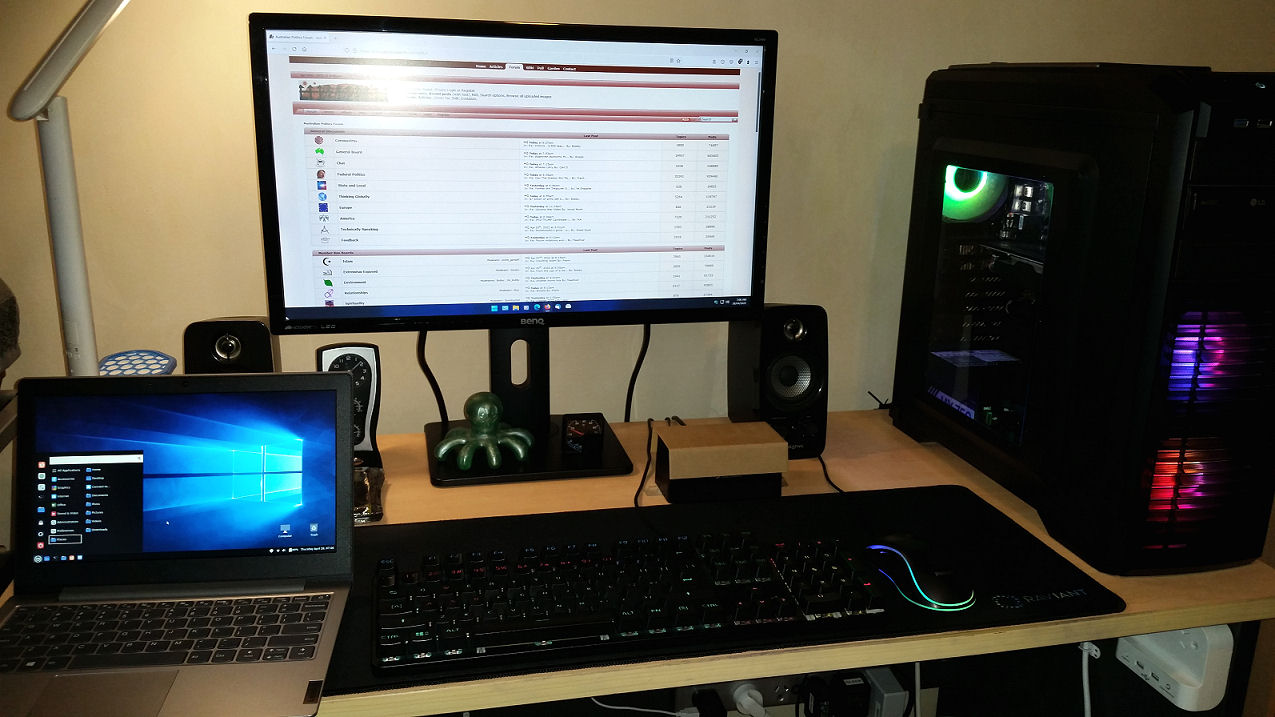
Well, I decided to reinstall Windows 11 on this "unsupported" PC in the attached picture and set everything up pretty much the same as I had everything set up in Windows 10.

Taking a while to get used to some of the changes but so far I'm liking 11 and I don't plan on going back to 10. I've done all of the Windows Updates with no problems and so far I haven't seen a message about running on unsupported hardware appear on the desktop.

I'll be setting up my other PC shortly which has a new motherboard and CPU (both "officially supported" by Microsoft for W11) to replace these ones. At least I was able to reuse the RAM in the new motherboard.

I'd actually put Windows 10 on there already now I'm going to wipe it and put 11 on... never mind, it passes the time I guess?

I'm also in the process of putting Windows 11 onto my little Lenovo laptop which I've had for about a year.  8-)
20220419_064929.jpg (102 KB | 8 )

Title: Re: Windows 11
Post by UnSubRocky on Apr 19th, 2022 at 1:06pm
Goodness me. I had to uninstall some programs I recently installed just to get my RAM down from 80% and my CPU down from 60%. Who knows how Windows 11 will work on my computer

Title: Re: Windows 11
Post by Carl D on Apr 28th, 2022 at 9:30am
I've swapped PC's over and I'm now using the other one which has the new motherboard and CPU and is fully Windows 11 "compliant".

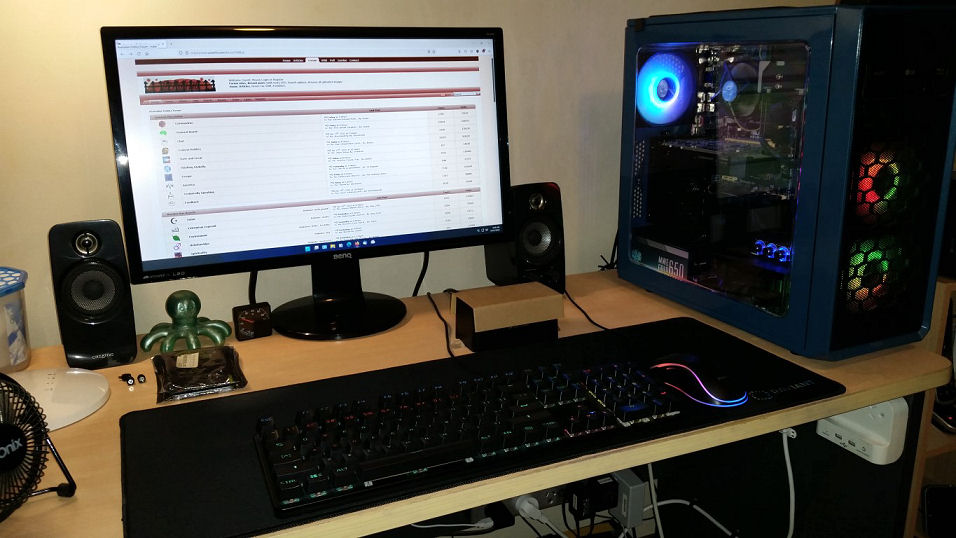
I've dismantled the older PC since my previous posts (I didn't particularly care for that blue case) and I'm getting a new case similar to the one on my desk right now. I'll reassemble it at a later date and I might get a separate desk to put in on with it's own keyboard, mouse and monitor rather than swapping PC's around every few weeks for updating, etc. I have a 21inch LCD TV here doing nothing at the moment that I can use as a monitor and I can also watch TV on it and also connect up my BluRay player.

I also have a little Lenovo laptop which I did a clean install of Windows 11 on last week and even though it fully "complies" with Windows 11's requirements it took ages to install 11 (the laptop only has 4GB of RAM and a slow Intel Celeron N4020 CPU) and then I spent another hour and a half trying to do Windows Updates on it and even though I was eventually informed it was "Up To Date" I found that I could no longer adjust the screen brightness (it was fine in Windows 10).

I gave up and put Linux Mint on the laptop and it was up and running in less than half an hour including installing updates and setting up Firefox and Thunderbird Mail (I've put a Windows 10 theme and wallpaper on it as you can see in the picture).

I only use the laptop for Internet and email while I'm watching TV in the lounge room in the evenings and Mint is just perfect for that.

The only problem I've had so far with Windows 11 on the main PC is the scanner for my 4 year old Epson XP-6100 printer and scanner won't work properly most of the time. Keep getting error messages about scanner not found or it's busy and in use (when it isn't).

A lot of people are having scanner problems with Windows 11 from what I've been reading. I'll just wait for an update or fix.

I have a big HP laser printer/scanner and that works OK with W11 so I can still scan things if I need to. I'm only keeping the Epson inkjet to print on those white printable DVD and BluRay discs occasionally... can't do that with a laser printer (the discs would probably melt even if there was a way of putting them through the laser printer.. lol).

I also bought a new adjustable monitor stand from our local Officeworks last week... I like the monitor up higher than it was on the original stand.
20220428_070645.jpg (151 KB | 9 )
Title: Re: Windows 11
Post by Captain Nemo on Apr 28th, 2022 at 11:34am
Speaking of BenQ monitors, my son's went on the fritz the other week - flickering and a small dark patch lower right hand border.

It is on the way out but turning anti-blur on in its settings made it useable again so I have inherited it for my clunker Laptop and it works pretty well!

I wonder how much longer it will last?

(p.s. It is about 8 years old and has been very good up until last week.)

Title: Re: Windows 11
Post by Carl D on Apr 28th, 2022 at 11:39am
My BenQ monitor is nearly 7 years old.

It's a 24" GL2460 and I haven't had a bit of trouble with it in all that time, no dead pixels, uneven light or anything. It only has DVI and D-sub inputs (I use DVI which is the better of the two).

I've thought about getting a new larger monitor from time to time but this one is just fine for me... if it eventually dies I'll need a new one, of course.

Title: Re: Windows 11
Post by Captain Nemo on Apr 28th, 2022 at 3:10pm
This one is :

BenQ 27inch LED Professional Gaming Monitor, 1920x1080, 1ms GtG, 12M:1, VGA, DVI,Display Port, 2x HDMI,USB,144Hz,Motion Blur Reduction, Low Blue Light
Model: XL2720Z (WTY - 3 year)


It has been excellent up till last week.

I reckon 27" is the maximum size I would go for.

Title: Re: Windows 11
Post by Marla on May 17th, 2022 at 6:25am
Micro$oft keeps giving me build updates every few days or so. It's really goofy, goofy as in Mico$oft seems to create problems such as folders, speed, security and then dismantles them only to create new ones. These are major updates, too. It's been over a year-and-a-half now and still no Android apps you can run unless you want to purchase specific ones from where else...Amazon.


So I'm convinced now it's f - king garbage as seems to be the trade with most Mico$oft products. Widows 11 was a marketing scheme to get gullible consumers to buy their overpriced Surface tablets and it appears that has backfired.

Title: Re: Windows 11
Post by agnesss on May 17th, 2022 at 12:48pm
waste +of time !

Title: Re: Windows 11
Post by UnSubRocky on May 17th, 2022 at 1:01pm
I tried to do a windows 11 update last year on my old computer. My computer pood itself and has not been able to work since. But, I do not know if it was the computer doing that or the windows 11 changeover.

Title: Re: Windows 11
Post by Marla on May 18th, 2022 at 5:37am

UnSubRocky wrote on May 17th, 2022 at 1:01pm:
I tried to do a windows 11 update last year on my old computer. My computer pood itself and has not been able to work since. But, I do not know if it was the computer doing that or the windows 11 changeover.


Sounds like your buddy Pooty hacked your system, comrade.

Title: Re: Windows 11
Post by The Heartless Felon on May 18th, 2022 at 8:52am

Marla wrote on May 18th, 2022 at 5:37am:

UnSubRocky wrote on May 17th, 2022 at 1:01pm:
I tried to do a windows 11 update last year on my old computer. My computer pood itself and has not been able to work since. But, I do not know if it was the computer doing that or the windows 11 changeover.


Sounds like your buddy Pooty hacked your system, comrade.


Aahh Millie, you do enjoy your pooty calls...

Title: Re: Windows 11
Post by UnSubRocky on May 18th, 2022 at 12:28pm

Marla wrote on May 18th, 2022 at 5:37am:

UnSubRocky wrote on May 17th, 2022 at 1:01pm:
I tried to do a windows 11 update last year on my old computer. My computer pood itself and has not been able to work since. But, I do not know if it was the computer doing that or the windows 11 changeover.


Sounds like your buddy Pooty hacked your system, comrade.


Too much junk on the computer led the old computer to crash. I want to transfer the RAM chips over to this computer to get the machine roaring.

Title: Re: Windows 11
Post by Captain Nemo on May 18th, 2022 at 11:51pm

UnSubRocky wrote on May 17th, 2022 at 1:01pm:
I tried to do a windows 11 update last year on my old computer. My computer pood itself and has not been able to work since. But, I do not know if it was the computer doing that or the windows 11 changeover.


You could try a fresh install on your old PC that pooed itself of the older Windows 10 via USB stick set up to install on another computer ...

Go with the download tool and follow the steps in "select Create installation media for another PC"


https://www.microsoft.com/en-au/software-download/windows10

Title: Re: Windows 11
Post by UnSubRocky on May 19th, 2022 at 12:46am

Captain Nemo wrote on May 18th, 2022 at 11:51pm:

UnSubRocky wrote on May 17th, 2022 at 1:01pm:
I tried to do a windows 11 update last year on my old computer. My computer pood itself and has not been able to work since. But, I do not know if it was the computer doing that or the windows 11 changeover.


You could try a fresh install on your old PC that pooed itself of the older Windows 10 via USB stick set up to install on another computer ...

Go with the download tool and follow the steps in "select Create installation media for another PC"

https://www.microsoft.com/en-au/software-download/windows10


I was not really clear about what I meant. I tried to install Windows 11. It did not work. I went back to using Windows 10. The computer crashed after about a week of reusing Windows 10. If Windows 11 did something to my computer during an attempted installation, then it might have been responsible for what happened for it to crash and not start up again.

I am looking to take the old RAM chips out of the computer and put it into this one. But, I might only have one or two slots to put the chips into. So, that 8Gb RAM chip might have to suffice. Unless I can get another 4Gb in with it. I would have a computer with 20Gb of RAM then.

Title: Re: Windows 11
Post by Captain Nemo on May 19th, 2022 at 11:06am
Oh, OK I had thought that the Windows 11 attempt had immediately pooed your PC.

No worries, please disregard my Windows 10 post.  8-)

Title: Re: Windows 11
Post by UnSubRocky on May 19th, 2022 at 11:51am
I can't turn my old computer on at all, now. It just won't load.

Title: Re: Windows 11
Post by Captain Nemo on May 19th, 2022 at 12:25pm

UnSubRocky wrote on May 19th, 2022 at 11:51am:
I can't turn my old computer on at all, now. It just won't load.


In that case, the USB stuff mentioned above might get it going again because the PC "should" boot off the Windows media created USB.

I think there is the option to keep documents that were on the dead PC but all other software would be wiped if you went ahead with the fresh install of Windows via the USB.


Title: !
Post by Jovial Monk on May 19th, 2022 at 7:25pm
Backup your drives, esp before playing with Windoze rubbish!

Title: Re: !
Post by UnSubRocky on May 20th, 2022 at 12:47pm

Jovial Monk wrote on May 19th, 2022 at 7:25pm:
Backup your drives, esp before playing with Windoze rubbish!


I should be able to access my old files when I put the hard drive into the docking station that I have and hook it up with my current computer.

Title: Re: Windows 11
Post by lee on May 20th, 2022 at 12:58pm
Did you have a system repair disk?

https://www.majorgeeks.com/content/page/5_bootable_isos_to_boot_and_repair_your_computer_for_free.html

Title: Re: Windows 11
Post by UnSubRocky on May 20th, 2022 at 1:32pm
Well, assuming that I want to reuse my 7 years old computer, instead of taking it apart for spare parts, I will consider what you said.

Title: Re: Windows 11
Post by Marla on Sep 21st, 2022 at 5:36am
Well, Micro$oft 22H2 was released today

https://youtu.be/P3IbMvt-908


Just more gimmicky crap

Title: Re: Windows 11
Post by random on Sep 21st, 2022 at 6:10am
As a young worker, I eagerly bought Windows 1.0

Here's what it did.

Loaded into RAM and displayed a GUI and mouse interface that only showed icons of applications you defined
If you clicked on an icon it launched the app, which were all character based.
But the Win 1.0 occupied almost all of the available 640K Ram so some of the apps could no load at all.

I kicked it off, dumped the purchase in the bin.

But because I worked for organisations that were MS based I had to use it at work.  The only two versions that were stable and half usable were 95 and Windows 7.

You cannot polish a turd.

Title: Re: Windows 11
Post by Marla on Sep 21st, 2022 at 7:05am
You're so wrong.


Micro$oft polishes turds every day

That's like...their job.

Title: Re: Windows 11
Post by Carl D on Sep 21st, 2022 at 8:46am
I have 2 desktop PC's and 2 laptops.

Not long ago I had all 4 running Windows 11 (one of the desktop PC's was "unsupported" but it ran OK).

Today, 3 of the 4 machines are running Windows 10 again.

The only machine with Windows 11 left on it is the smaller laptop and that might be back on Windows 10 before too much longer depending on what "22H2" looks and behaves like.

Seems like "change for the sake of change" is the mantra at Microsoft (and a lot of other software companies) these days. Why keep changing and moving things around (and adding more and more useless cr@p) when something like Windows 7 was adequate and functional for most people?

I believe a lot of it has to do with keeping employees (or employees keeping themselves) "gainfully employed" - if they had nothing to do they would be out of a job.

Title: Re: Windows 11
Post by Bobby. on Sep 21st, 2022 at 8:47am

random wrote on Sep 21st, 2022 at 6:10am:
As a young worker, I eagerly bought Windows 1.0

Here's what it did.

Loaded into RAM and displayed a GUI and mouse interface that only showed icons of applications you defined
If you clicked on an icon it launched the app, which were all character based.
But the Win 1.0 occupied almost all of the available 640K Ram so some of the apps could no load at all.

I kicked it off, dumped the purchase in the bin.

But because I worked for organisations that were MS based I had to use it at work.  The only two versions that were stable and half usable were 95 and Windows 7.

You cannot polish a turd.


Win95 was the most unstable OS in human history -
so you don't know what you're talking about.

Title: Re: Windows 11
Post by random on Sep 21st, 2022 at 9:09am

Bobby. wrote on Sep 21st, 2022 at 8:47am:

random wrote on Sep 21st, 2022 at 6:10am:
As a young worker, I eagerly bought Windows 1.0

Here's what it did.

Loaded into RAM and displayed a GUI and mouse interface that only showed icons of applications you defined
If you clicked on an icon it launched the app, which were all character based.
But the Win 1.0 occupied almost all of the available 640K Ram so some of the apps could no load at all.

I kicked it off, dumped the purchase in the bin.

But because I worked for organisations that were MS based I had to use it at work.  The only two versions that were stable and half usable were 95 and Windows 7.

You cannot polish a turd.


Win95 was the most unstable OS in human history -


Exactly, but it was the best of the Microsoft systems.

Wat I sed.

Title: Re: Windows 11
Post by random on Sep 21st, 2022 at 9:15am

Carl D wrote on Sep 21st, 2022 at 8:46am:
I have 2 desktop PC's and 2 laptops.

Why keep changing and moving things around (and adding more and more useless cr@p) when something like Windows 7 was adequate and functional for most people?


The Windows 7 interface was very like a Mac, not by accident.  I could pretty seamlessly move from one to the other.  I used to help family when they had issues with windows, my old DOS experience came in handy.  But after 7, I declined to be involved.  One had a series of big issues, in the end I told him to go easy one himself and get a Mac. 

All he really needed was an ipad, but was exposed to the complex animal that is Windows.

Title: Re: Windows 11
Post by Bobby. on Sep 21st, 2022 at 9:24am

random wrote on Sep 21st, 2022 at 9:09am:

Bobby. wrote on Sep 21st, 2022 at 8:47am:

random wrote on Sep 21st, 2022 at 6:10am:
As a young worker, I eagerly bought Windows 1.0

Here's what it did.

Loaded into RAM and displayed a GUI and mouse interface that only showed icons of applications you defined
If you clicked on an icon it launched the app, which were all character based.
But the Win 1.0 occupied almost all of the available 640K Ram so some of the apps could no load at all.

I kicked it off, dumped the purchase in the bin.

But because I worked for organisations that were MS based I had to use it at work.  The only two versions that were stable and half usable were 95 and Windows 7.

You cannot polish a turd.


Win95 was the most unstable OS in human history -


Exactly, but it was the best of the Microsoft systems.

Wat I sed.


I remember doing some CAD design at work back in the mid 90s using Win95
and a new CAD package of software.
I had to save the results every 30 minutes as a file with a new name -
in case the computer failed with that "blue screen of death" -
that everyone saw on Win95 - usually once per day.
That saved me losing all my work many times.
If you didn't you could lose a whole week of design as
even the file you saved could be corrupted as well -
hence the need to keep multiple updated versions.

WinXP was a lot better and then Win7 - 64 bit was better still.
I now have Win10 - 64 bit and it's not bad but really no better than Win7.
I shudder to think of loading Win11 as I know
many of my important legacy programs won't work.

Title: Re: Windows 11
Post by Captain Nemo on Sep 21st, 2022 at 10:46am

random wrote on Sep 21st, 2022 at 6:10am:
As a young worker, I eagerly bought Windows 1.0

Here's what it did.

Loaded into RAM and displayed a GUI and mouse interface that only showed icons of applications you defined
If you clicked on an icon it launched the app, which were all character based.
But the Win 1.0 occupied almost all of the available 640K Ram so some of the apps could no load at all.

I kicked it off, dumped the purchase in the bin.

But because I worked for organisations that were MS based I had to use it at work.  The only two versions that were stable and half usable were 95 and Windows 7.

You cannot polish a turd.


Oh yes you can ...

[media width=640]https://youtu.be/yiJ9fy1qSFI[/media]

Title: Re: Windows 11
Post by AusGeoff on Nov 22nd, 2022 at 9:23am

I thought I'd try Windows 11 yesterday;  I'm currently more than
happy with 10, but it's easy to roll back if you don't like 11.

I couldn't see even one advantage over 10.  Are there any?

I've had the task bar vertical on the left-hand side of the screen
for 20 years, but you now have put up with it fixed on the bottom
of the screen.  Doesn't MS understand muscle memory?

The default slider bars are too skinny, and too hard to click on
quickly.  I slipped into regedit and attempted to thicken them
up, but it only worked on some sites, or mostly not at all.

File manager has become even more clumsy for quick use too.

All in all it's a waste of time "upgrading" to 11.     Avoid.


Title: Re: Windows 11
Post by Carl D on Nov 22nd, 2022 at 10:06am
Yep, I agree with everything you've posted Geoff.

I have 2 desktop PC's and 2 laptops here. About 6 months ago I had Windows 11 on all 4 of them (I had to use the well known 'bypass' tricks to install 11 on the older, 2013 vintage  PC. Well, older motherboard and CPU actually - it's in a new tower I bought earlier this year).

Today, I have Windows 10 back on both desktop PC's (one Pro, one Home) and I have Linux Mint on both laptops.

Too much work involved with maintaining and updating Windows on 4 devices - especially the 2 laptops - the monthly Windows Updates can take up to an hour to install on the laptops - they're pretty cheap and slow laptops but I only use them for web browsing and email, etc.

Still need to do updates with Linux Mint, of course but they're so much easier to do compared with Windows, all of the updates for the Linux operating system and everything that is installed are all in the 'one convenient location' and downloading and installing them is a breeze.

Australian Politics Forum » Powered by YaBB 2.5.2!
YaBB Forum Software © 2000-2026. All Rights Reserved.