| Australian Politics Forum | |
|
http://www.ozpolitic.com/forum/YaBB.pl
General Discussion >> Technically Speaking >> Upgrading my laptop HDD to a SSD http://www.ozpolitic.com/forum/YaBB.pl?num=1448684991 Message started by Redneck on Nov 28th, 2015 at 2:29pm |
|
|
Title: Upgrading my laptop HDD to a SSD Post by Redneck on Nov 28th, 2015 at 2:29pm
Hi Guys, have any of you had any experience with SSDs (Solid State Drives) to replace your HDDs (Hard Disk Drives)
My Toshiba Laptop (An I7 with max RAM) is a bit overloaded with software and is starting to run slow on occasions, HDD has about 70Gb free of 320Gb and runs at 100% for an extended period on boot up, and is frustratingly slow on other occasions. I have decided to replace my 320Gb HDD with a 480Gb SSD. I did consider the Hybrid drive but thought the SSD would be better Interested in your thoughts! |
|
Title: Re: Upgrading my laptop HDD to a SSD Post by Dnarever on Nov 28th, 2015 at 2:38pm Redmond Neck wrote on Nov 28th, 2015 at 2:29pm:
In the early days of SSD's I had some problems but got there in the end. First I would say that it is not real likely that the HDD is the problem causing speed issues if there is that much free space. The speed problems will likely relate to how many things are running at the same time. maybe have a look at fault logs, if the current HDD is failing that is a different thing. The thing I found with the early SSD's is that when installing the OS like windows you had to do the press F8 option to install other devices and then load the SSD driver or it would not be recognised by the system. I suspect that this has been overcome and most recent laptops recognise this type of drive now. I still think that SSD drives are less reliable than normal drives overall but the gap in now narrow. |
|
Title: Re: Upgrading my laptop HDD to a SSD Post by Redneck on Nov 28th, 2015 at 2:48pm
bugger!
I have ordered one so its a bit late now. I was looking for more space and speed but couldnt afford the 960Gb I will keep you informed. LOL! ;D |
|
Title: Re: Upgrading my laptop HDD to a SSD Post by Sprintcyclist on Nov 28th, 2015 at 3:13pm Dnarever wrote on Nov 28th, 2015 at 2:38pm:
Quote:
that's surprising. Still, HDDs are very good. I defrag mine often using prirform defragger and use piriform Ccleaner too. they seem good. |
|
Title: Re: Upgrading my laptop HDD to a SSD Post by Honky on Nov 28th, 2015 at 3:31pm Redmond Neck wrote on Nov 28th, 2015 at 2:48pm:
I have one, but I have little more than the OS loaded on it. It's only 128gb. Booting up used to take a few minutes, it's now maybe 20 seconds. |
|
Title: Re: Upgrading my laptop HDD to a SSD Post by Redneck on Nov 28th, 2015 at 3:39pm ... wrote on Nov 28th, 2015 at 3:31pm:
Well boot up pisses me right off, so that might be a positive if nothing else! |
|
Title: Re: Upgrading my laptop HDD to a SSD Post by Neferti on Nov 28th, 2015 at 3:45pm
I also have a Toshiba laptop, i7, must be 3-4 years old now (?). It came with a heap of Toshiba crap that takes up a LOT of space, so I uninstalled a lot of it. Searched first to make sure it wouldn't blow the laptop up. The Laptop runs Win 7.
This Desktop "games machine" that I had built by J & W computers in Sydney has an SSD drive (and 32.0 GB RAM). Got it maybe 2 years ago? I prefer the Desktop, even though it has Win 8.1 to the Laptop. Haven't answered your question, Red, but I have "contributed". ;D |
|
Title: Re: Upgrading my laptop HDD to a SSD Post by Redneck on Nov 28th, 2015 at 3:51pm
Well done Nef, I have wondered about going back to a purpose built desktop, but mine is a great laptop, I think I need a gamer spec'd laptop even thogh I dont do gaming at all.
I guess its why I still drive a thirsty v8 ( Not A 10year old BMW though Lisa), I like a bit of oomph! Cheers |
|
Title: Re: Upgrading my laptop HDD to a SSD Post by Dnarever on Nov 28th, 2015 at 4:03pm Redmond Neck wrote on Nov 28th, 2015 at 2:48pm:
They are a lot faster so you will get speed particularly with booting and if you need to install the driver it isn't difficult and the driver should come with the drive. If you remember windows installs it is where it asks if you need to install additional drivers like a sccsi drive - same thing. It will be faster but what I meant is that the old drive is probably not the current speed bottleneck unless it is failing. |
|
Title: Re: Upgrading my laptop HDD to a SSD Post by Dnarever on Nov 28th, 2015 at 4:08pm Sprintcyclist wrote on Nov 28th, 2015 at 3:13pm:
I would not do that with a SSD as its lifetime is governed by the number of reads and writes. They get extra life out of them not by making them better so much as by providing redundancy. as a sector fails it is replaced. The drive effectively has twice the space it's attributed in capacity in order to extend its life. i.e A 1T drive would actually be a 2T drive with a spare T up its sleeve or that is what they were doing about 15 months ago.. Defragging one of these serves no purpose other than to prematurely wear it out. |
|
Title: Re: Upgrading my laptop HDD to a SSD Post by Redneck on Nov 28th, 2015 at 4:12pm Dnarever wrote on Nov 28th, 2015 at 4:03pm:
I totally understand regarding the HDD, its fine, regarding startup, I have removed everything I can using a startup manager and uninstalled lots of crap but its still a pita at times so I thought I would try this. Unfortunately the ram is limited on the laptop even though I have the max 8gb I think it is Cheers |
|
Title: Re: Upgrading my laptop HDD to a SSD Post by Sir Bobby on Nov 28th, 2015 at 4:19pm |
|
Title: Re: Upgrading my laptop HDD to a SSD Post by Sprintcyclist on Nov 28th, 2015 at 4:32pm Dnarever wrote on Nov 28th, 2015 at 4:08pm:
thanks dna, I was unaware of the failure of those. Yes, defragging would be pointless. This ASUS has a sleep setting, so it starts quickly. |
|
Title: Re: Upgrading my laptop HDD to a SSD Post by Redneck on Nov 28th, 2015 at 4:34pm
Thanks lads, you have all done very well !
Mr Grace |
|
Title: Re: Upgrading my laptop HDD to a SSD Post by Kytro on Dec 1st, 2015 at 2:06pm
While it is true that SSDs have a limited number of reads and writes, for modern drives you would need to write between 6-10 TB of data a day to have them reach the limit within 10 years.
SSDs are considerably faster spinning disks and for large reading and writing tasks make quite the difference. I have a series of 3 in raid0 |
|
Title: Re: Upgrading my laptop HDD to a SSD Post by Redneck on Dec 8th, 2015 at 4:13pm
This is a lesson in why one shouldnt drink...note Aquascoot!
1. Firstly check the size of your current HDD. Not sure how but I didnt add up the size of all the partitions correctly. Bloody thing was too small. (484Gb) 2. After having a few grogs (as some do), I ordered and received what I thought was a 1TB SSD at an excellent price. Damn! It was advertised as a SSHD which I misread as a 1TB SSD Damn! It is a 1TB Hybrid drive ie some SSD and a 1TB HDD combined Cloned my old drive and installed it to see what it was like. Good news, it is flaming fantastic compared to the old HDD much quicker in every way. WOOPPEE!!!!! ;) Moral of the story, get aquascoot to do the ordering |
|
Title: Re: Upgrading my laptop HDD to a SSD Post by Neferti on Dec 8th, 2015 at 4:35pm
Why on earth would anybody "upgrade" a laptop? Just buy a new one. ;D
|
|
Title: Re: Upgrading my laptop HDD to a SSD Post by Redneck on Dec 8th, 2015 at 4:48pm
It is still running the latest 17 intel processor with max Ram etc. New one would be no better
I am just a bit of a nerd with loading all sorts of software etc on my pC. |
|
Title: Re: Upgrading my laptop HDD to a SSD Post by Baronvonrort on Dec 8th, 2015 at 4:49pm Neferti wrote on Dec 8th, 2015 at 4:35pm:
I thought buying a new one is upgrading. With these SSD does size count,is bigger better? |
|
Title: Re: Upgrading my laptop HDD to a SSD Post by Redneck on Dec 8th, 2015 at 4:54pm Baronvonrort wrote on Dec 8th, 2015 at 4:49pm:
The laptop PC despite still being a quite modern processor was running very slow and I was upgrading the old HDD (hard Disk drive) to an SSD (Solid State Drive) which are much faster. Anyway I have ended up with the SSHD Hybrid drive which is still very fast but a lot cheaper than the 1TB SSD so a step in the right direction. |
|
Title: Re: Upgrading my laptop HDD to a SSD Post by Redneck on Dec 8th, 2015 at 5:52pm
Well to anyone of you out there whos PC is slow to boot up, slow to open programs, this is a great solution, although maybe not as good as an SSD which is much dearer at this stage but will get cheaper with time.
My Pc is behaving like a new one. Fabulous, I would recommend going to the Hybrid drive as I have for about $115 for a 1TB |
|
Title: Re: Upgrading my laptop HDD to a SSD Post by Redneck on Dec 8th, 2015 at 6:01pm
The SSHD Hybrid drive uses an algorithm to determine the most used data which it places on the SSD portion of the drive
Quote:
http://www.pcworld.com/article/2012223/hybrid-hard-drives-how-they-work-and-why-they-matter.html |
|
Title: Re: Upgrading my laptop HDD to a SSD Post by Redneck on Dec 8th, 2015 at 6:07pm
Mmmmm on reflection, not recommended for Herb!
;) Unless he pays me to do it for a $1000 ;) |
|
Title: Re: Upgrading my laptop HDD to a SSD Post by Kytro on Dec 9th, 2015 at 8:07am Baronvonrort wrote on Dec 8th, 2015 at 4:49pm:
Usually. The larger drives are faster than the smaller ones. |
|
Title: Re: Upgrading my laptop HDD to a SSD Post by Dnarever on Dec 9th, 2015 at 8:46am Redmond Neck wrote on Dec 8th, 2015 at 5:52pm:
Good work red I am glad it worked for you. |
|
Title: Re: Upgrading my laptop HDD to a SSD Post by Kat on Dec 9th, 2015 at 4:01pm
Haven't tried an SSD as yet.
BUT... The Super-Lappy is now getting on for 4 years old and, although it can still hold its own against all but the newest top-shelf laptops I've decided to give it a bit of an upgrade. First step will be upping its RAM from 8GB to 16GB. Second step will be a 250GB SSD. Yes, I do need a decent-sized one - my Win 10 installation is 130GB, the Win 8.1 installation is almost double that. My current C;/ drive is a 350GB 5400rpm 'spinner' (half of a 750GB drive, of which there are two). |
|
Title: Re: Upgrading my laptop HDD to a SSD Post by tickleandrose on Dec 10th, 2015 at 11:08am
My brother switched my laptop HD from the old one to the new SSD 250 GB. And it works like a treat. The windows starting is much faster.
Although, this took him like 2 days, and at the end he said to me never again. |
|
Title: Re: Upgrading my laptop HDD to a SSD Post by Redneck on Dec 10th, 2015 at 1:23pm Kat wrote on Dec 9th, 2015 at 4:01pm:
So your laptop can take two drives? Mine is an I7 processor but is limited to 8Gb Ram and 1 HDD slot |
|
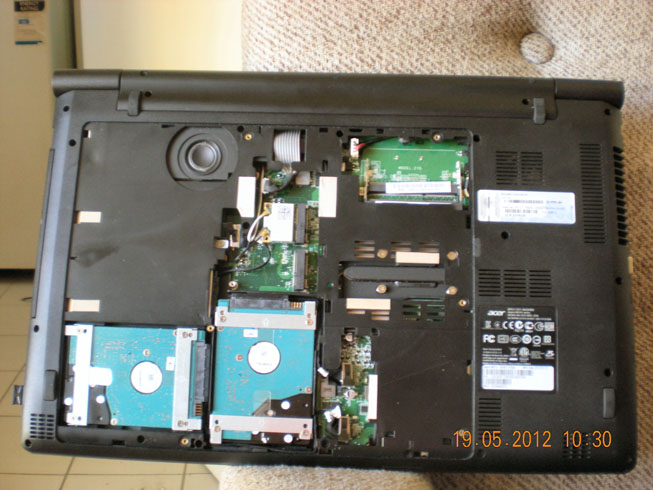
Title: Re: Upgrading my laptop HDD to a SSD Post by Kat on Dec 10th, 2015 at 5:43pm Redmond Neck wrote on Dec 10th, 2015 at 1:23pm:
Under the 'bonnet' of the Super-Lappy - not the greatest shot ever, but you get the drift. The small circular object top-left is the sub-woofer for the Dolby 5.1 sound. DSCN2749.jpg (99 KB | 49
) |
|
Title: Re: Upgrading my laptop HDD to a SSD Post by Redneck on Dec 10th, 2015 at 8:08pm
Thanks kat
So the two hDD are bottem left. What brand and procesor was it? |
|
Title: Re: Upgrading my laptop HDD to a SSD Post by Kat on Dec 10th, 2015 at 8:37pm
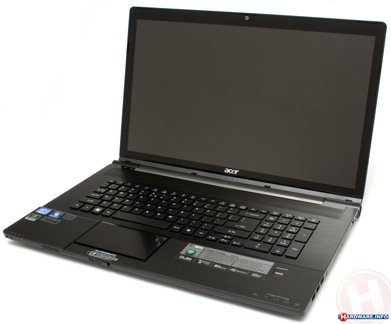
Acer Aspire 'Ethos' 8951G desktop-replacement laptop.
PROCESSOR: 2nd-gen Intel i7 2670QM quad-core @3.1Ghz (maximum). RAM: 8GB (maximum 16GB). GRAPHICS: Intel 3000 onboard, and a GeForce GT555M with 2 GB VRAM. HDD: 2 x Toshiba 750GB. SCREEN: 18.4" full-HD. OPTICAL DRIVE: CD/DVD/Blu-Ray. SOUND: Dolby 5.1 Its only major drawback is that it is very large and very heavy, compared to a 'normal' laptop, so it isn't easily very portable. acer_aspire_ethos_8951g2418g75bn_A_003.jpg (80 KB | 65
) |
|
Title: Re: Upgrading my laptop HDD to a SSD Post by abdullah on Dec 10th, 2015 at 9:25pm
SSD will run out of writes depending on how you use your drive. Heavy use 1 year. Google for finer points.
Just make sure you backup to an external drive if you can then. Regularly. Preferably a Sata or network drive connection and not USB. |
|
Title: Re: Upgrading my laptop HDD to a SSD Post by Kat on Dec 10th, 2015 at 10:41pm abdullah wrote on Dec 10th, 2015 at 9:25pm:
Apparently, though, they have become much better in this respect. Can't agree more. Backups have saved my ass more than once or twice over the years. |
|
Title: Re: Upgrading my laptop HDD to a SSD Post by abdullah on Dec 10th, 2015 at 10:59pm Kat wrote on Dec 10th, 2015 at 10:41pm:
Yeah that was a few years ago for us, we had the best one on the market at the time. I gave it to a mate and he just had the OS on it. It booted bloody fast. One year later it carked it. The OS's work better with them now also. |
|
Title: Re: Upgrading my laptop HDD to a SSD Post by Aussie on Dec 11th, 2015 at 7:26pm |
|
Title: Re: Upgrading my laptop HDD to a SSD Post by Kat on Dec 11th, 2015 at 7:44pm Aussie wrote on Dec 11th, 2015 at 7:26pm:
Like most programs of this type, can be useful if you know what you're doing, but are potentially lethal to your data and sanity if you do not. No, I have not yet tested this particular one. Also, bear in mind that blindly clicking 'OK' when installing these kinds of program WILL put unwanted programs onto your machine. READ each screen carefully before proceeding. |
|
Title: Re: Upgrading my laptop HDD to a SSD Post by Kytro on Dec 14th, 2015 at 10:03am abdullah wrote on Dec 10th, 2015 at 9:25pm:
The amount of data transfer required to kill modern SSDs is significant. Consumers will not be hitting this limit in a year. Most modern 250GB SSDs don't start hitting serious errors around the 1 PB range of data and some have lasted more than 2 PB before becoming unusable. At 1 PB you would need to be doing read/writes worth 2.7 TB a day to kill it in year, and about 550 GB a day to kill it in 5 years. That's almost double the drive capacity every day for 5 years. Larger drives obviously last longer |
|
Title: Re: Upgrading my laptop HDD to a SSD Post by Redneck on Dec 14th, 2015 at 10:24am Aussie wrote on Dec 11th, 2015 at 7:26pm:
Well Getting fed up with the services delivered by Turbo Your PC software is a piece of cake. This pseudo system optimization suite causes user experience and computer performance issues instead of fixing them, which is an evidence of rogue activity. The scan run by the program is intended to frighten you by returning a detections list full of incomplete registry keys, invalid file extensions, missing CLSID references, as well as redundant cached Windows updates and temporary files that take up hard disk space. These reports, as it turns out, are not trustworthy for the most part, because the built-in engine for identifying PC errors was found to lack the respective functionality. The utility, consequently, provides fabricated information in order to cheat users into buying the license in exchange for the spoof cleanup. http://nabzsoftware.com/types-of-threats/turbo-your-pc |
|
Title: Re: Upgrading my laptop HDD to a SSD Post by Fit of absent mindedness on Dec 14th, 2015 at 12:17pm
Once you go ssd, you will never want to go back.
Some laptops have odd (optical disk drive) replacements where you can install a second hard drive - keep the current hdd as backup? Also, don't ever download any turbo your p.c or ram optimisers - these are a bunch of shite. What brand/model is your latop redneck? |
|
Title: Re: Upgrading my laptop HDD to a SSD Post by Redneck on Dec 14th, 2015 at 12:33pm 21st Century Dialup Network wrote on Dec 14th, 2015 at 12:17pm:
Its a Toshiba Satellite A665. Its an Intel i7 processor X64 quite a few years old now, it was starting to run a bit slow at times due to my being a bit of a software freak always trying out new programs. Anyway the 1TB SSHD Hybrid drive has worked wonders with both start-up and running programs, refreshing pages etc. |
|
Title: Re: Upgrading my laptop HDD to a SSD Post by Fit of absent mindedness on Dec 14th, 2015 at 1:52pm
Good work!
An ssd speeds up computers as does more ram and a better cpu in most cases. |
|
Title: Re: Upgrading my laptop HDD to a SSD Post by Redneck on Dec 20th, 2015 at 11:04am
A couple of articles on SSD drives
https://davescomputertips.com/laymans-tech-solid-state-drives/?utm_source=wysija&utm_medium=email&utm_campaign=Weekly+Recap+Newsletter This one is a reliability test of some SSDs, which was designed to test them under extreme number of "writes" as SSDs are limited in the number of write functions they can handle Over the past 18 months, we’ve watched modern SSDs easily write far more data than most consumers will ever need. The important takeaway is that all of the drives wrote hundreds of terabytes without any problems. Their collective endurance is a meaningful result. http://techreport.com/review/27909/the-ssd-endurance-experiment-theyre-all-dead |
|
Title: Re: Upgrading my laptop HDD to a SSD Post by Redmond Neck on Oct 7th, 2016 at 7:15pm
Why is red still online at this time of night?
I am at it again I have a little 11" Laptop that I bought for travelling many years ago 1998? U Worse decision I ever made, for a couple of hundred dollars more could have bought a 13" laptop with a CD drive and reasonable modern processor at the time It is as slow as a wet week, friggin drives one mad. So I am trying an ssd upgrade as I installed one in my reasonable modern laptop and it is brilliant. I will keep you informed in case Herb is interested! :) |
|
Title: Re: Upgrading my laptop HDD to a SSD Post by Setanta on Oct 16th, 2016 at 11:45pm Kytro wrote on Dec 1st, 2015 at 2:06pm:
They don't spin, they are memory, solid state drives hence SSD. edit: If you are really striping three of them then use raid 4 and keep the parity on a spinning disk. If you lose one in a striped array you lose them all. |
|
Australian Politics Forum » Powered by YaBB 2.5.2! YaBB Forum Software © 2000-2026. All Rights Reserved. |